 By the NAXTECH team · Published 24 Sept 2026 · Updated 15 Oct 2026 · Hands-on with v1.0

Your mother counted it on her fingers, and so did her mother: seven days before your period and seven days after are the "safe" ones, and the middle of the month is when you have to be careful. It is one of the most repeated pieces of folk wisdom in Thailand — and also one of the easiest to miscount, because the window moves every month with your own cycle. หน้า 7 หลัง 7 takes that mental arithmetic off your fingers and draws it on a calendar.
The app does one thing and does it plainly. You tell it when your last period started and how your cycle behaves, and it paints every day of the month in the colour it belongs to, so you can see the safe window and the risky window at a glance instead of recalculating them each time.
The name is the method. หน้า 7 — "the front seven" — are the first seven days counted from the day your period arrives. หลัง 7 — "the back seven" — are the last seven days before your next period is due. In the traditional belief these two stretches are the lower-fertility days, while the span in the middle of the cycle is treated as the time you are most likely to conceive. The app follows that rule exactly: it marks the seven days from your period start and the seven days before the next expected period as safe, and flags everything from day eight up to the final week as a pregnancy-risk day.
No two cycles are identical, so the calendar is built from your numbers, not an average. Tap the calendar button to pick the first day of your most recent period (you can go back up to a year). Then set your period length anywhere from 3 to 10 days with the plus and minus buttons, and your cycle length from 21 to 40 days. Change any value and the whole calendar recolours instantly — there is no save button to hunt for and nothing to sync.
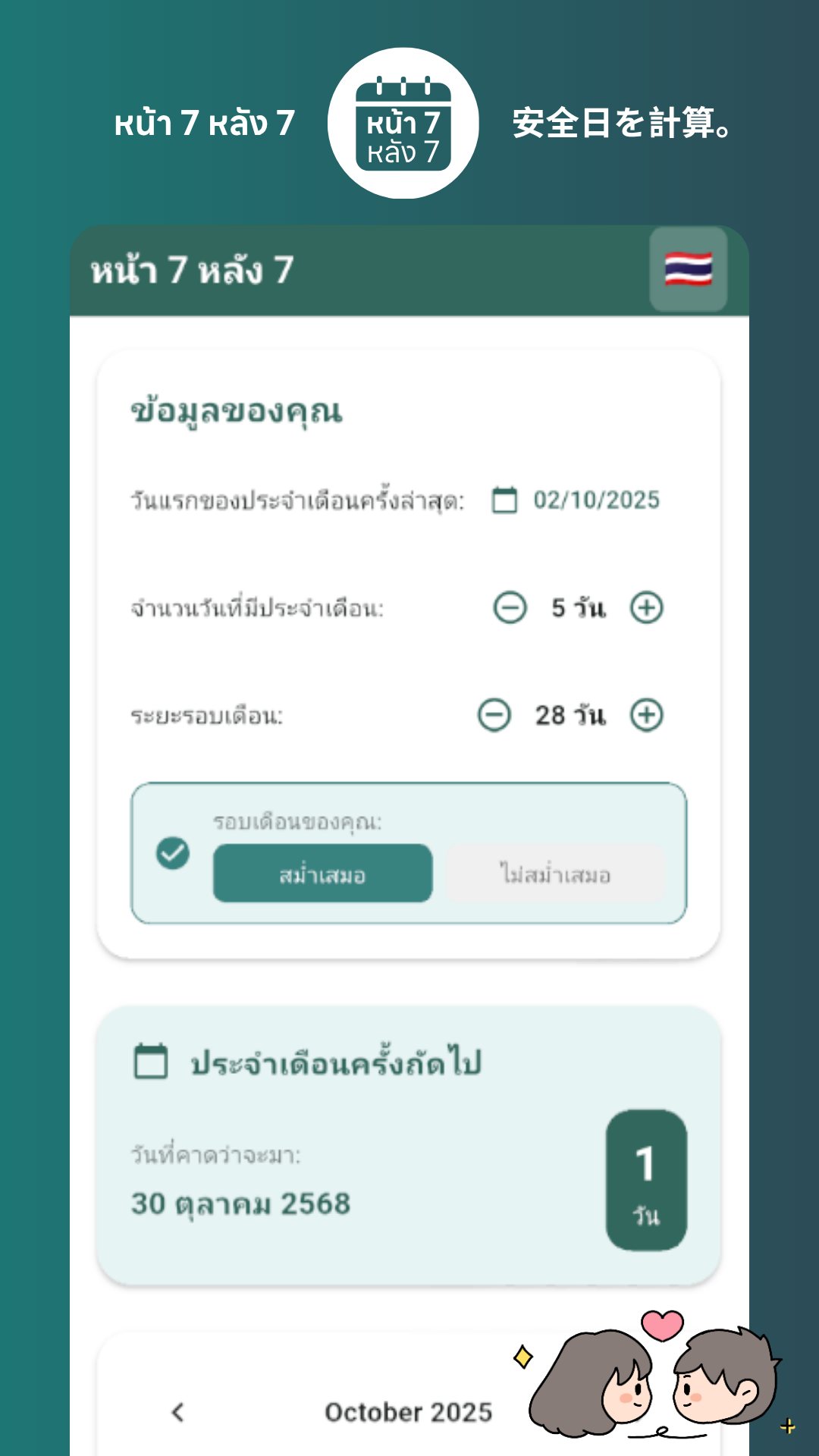
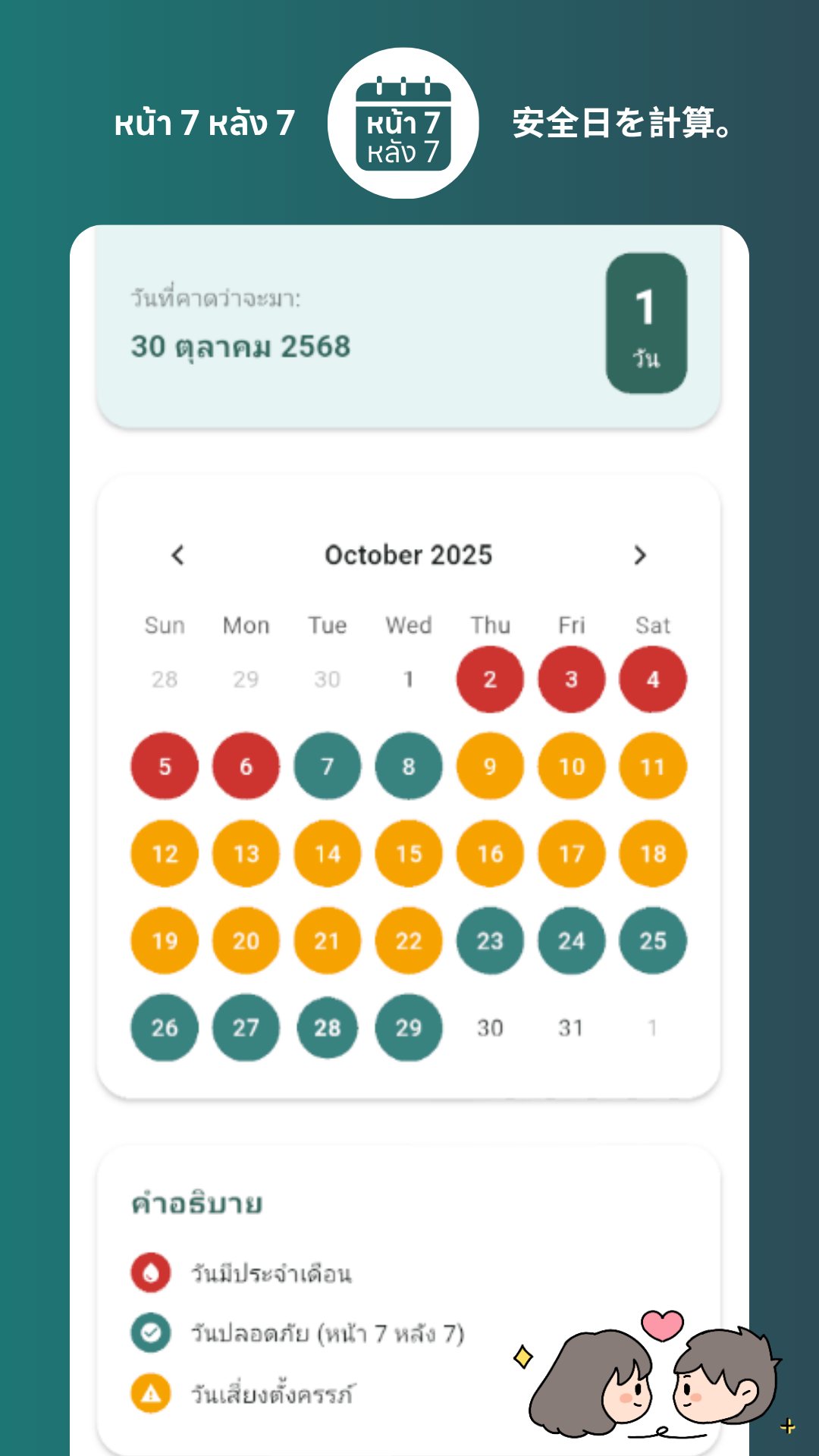
Once your dates are in, a full month calendar fills in with three colours: red for the days you have your period, teal for the safe days of หน้า 7 and หลัง 7, and orange for the pregnancy-risk days in between. A small legend under the calendar spells out what each colour means. Above it, a prediction card shows the date your next period is expected and counts down the exact number of days until it arrives, so the next cycle is never a surprise.
The whole method only works when your cycle is predictable, and the app does not pretend otherwise. A simple toggle lets you mark your cycle as regular or irregular, and the moment you choose irregular it raises a warning: the counting works reliably only for regular cycles, and when a cycle is irregular the prediction carries a very high risk and should not be relied on for contraception. It is a refreshing bit of honesty in an app that could easily have oversold itself.
Dates are shown the Thai way — day, Thai month name and the Buddhist-era year (B.E., your year + 543) — so nothing needs translating in your head. Everything is computed on your phone: the only permission the app requests is internet access, and that is purely to load its single banner ad. There is no account, no cloud and no cycle history leaving your device, which for a subject this private matters a great deal.
หน้า 7 หลัง 7 is a traditional folk guideline, not a medically reliable form of birth control — even for a perfectly regular cycle it is not 100% safe, and the app says so in plain words. Treat it as a way to understand and visualise your cycle, not as your only method of contraception. For reliable family planning or any health concern, talk to a doctor or pharmacist.
Yes. Every calculation runs on your phone, and the only reason it uses the internet is to show one banner ad, so the calendar works with no connection.
No. It is a traditional folk guideline that is not 100% safe even with a regular cycle, and it should not be used as your only form of contraception.
You can mark it as irregular, but the app will warn you that the prediction is then very high risk; the method is only meant for regular cycles.
No. There is no account or sign-up, and your dates stay on your device.
Get หน้า 7 หลัง 7 on Google Play →
โดย ทีมงาน NAXTECH · เผยแพร่ 3 ก.ค. 2569 · อัปเดต 1 ก.ย. 2569 · ทดลองใช้เวอร์ชัน 1.0
คุณแม่นับนิ้วให้ดู คุณยายก็นับแบบเดียวกัน: เจ็ดวันก่อนประจำเดือนมาและเจ็ดวันหลังจากนั้นคือวัน "ปลอดภัย" ส่วนช่วงกลางเดือนคือช่วงที่ต้องระวัง สูตรนี้เป็นภูมิปัญญาพื้นบ้านที่คนไทยพูดต่อกันมานาน แต่ก็เป็นสูตรที่นับพลาดง่ายที่สุดเช่นกัน เพราะช่วงวันจะขยับไปทุกเดือนตามรอบเดือนของแต่ละคน แอปหน้า 7 หลัง 7 จึงมาช่วยยกการนับนิ้วนั้นขึ้นมาวาดลงบนปฏิทินแทน
แอปนี้ทำหน้าที่เดียวแต่ทำให้ชัด คุณแค่บอกว่าประจำเดือนครั้งล่าสุดมาวันไหน และรอบเดือนของคุณเป็นอย่างไร จากนั้นแอปจะระบายสีทุกวันในเดือนตามประเภทของมัน ทำให้มองเห็นช่วงวันปลอดภัยและช่วงวันเสี่ยงได้ในพริบตา โดยไม่ต้องมานั่งคำนวณใหม่ทุกครั้ง
ชื่อแอปก็คือวิธีนับ หน้า 7 คือเจ็ดวันแรกนับจากวันที่ประจำเดือนมา ส่วน หลัง 7 คือเจ็ดวันสุดท้ายก่อนที่ประจำเดือนรอบถัดไปจะมา ตามความเชื่อดั้งเดิมสองช่วงนี้คือวันที่โอกาสตั้งครรภ์ต่ำ ขณะที่ช่วงกลางรอบเดือนถือเป็นช่วงที่มีโอกาสตั้งครรภ์สูงที่สุด แอปทำตามสูตรนี้ตรงตัว คือทำเครื่องหมายวันปลอดภัยให้กับเจ็ดวันแรกนับจากวันเริ่มประจำเดือน และเจ็ดวันก่อนรอบถัดไป ส่วนตั้งแต่วันที่แปดไปจนถึงสัปดาห์สุดท้ายจะถูกระบายเป็นวันเสี่ยงตั้งครรภ์
รอบเดือนของแต่ละคนไม่เหมือนกัน ปฏิทินจึงสร้างจากตัวเลขของคุณ ไม่ใช่ค่าเฉลี่ย แตะปุ่มปฏิทินเพื่อเลือก วันแรกของประจำเดือนครั้งล่าสุด (ย้อนหลังได้ถึงหนึ่งปี) จากนั้นปรับ จำนวนวันมีประจำเดือนได้ตั้งแต่ 3 ถึง 10 วัน ด้วยปุ่มบวกลบ และตั้ง ระยะรอบเดือนได้ตั้งแต่ 21 ถึง 40 วัน พอแก้ค่าใดค่าหนึ่ง ปฏิทินทั้งหน้าก็จะเปลี่ยนสีใหม่ทันที ไม่มีปุ่มบันทึกให้ต้องกด และไม่มีอะไรต้องซิงก์
พอกรอกวันที่เสร็จ ปฏิทินรายเดือนจะเติมเต็มด้วยสามสี ได้แก่ แดง สำหรับวันที่มีประจำเดือน เขียวน้ำทะเล สำหรับวันปลอดภัยของหน้า 7 และหลัง 7 และ ส้ม สำหรับวันเสี่ยงตั้งครรภ์ที่อยู่ตรงกลาง ด้านล่างปฏิทินมีคำอธิบายสีกำกับไว้ ส่วนด้านบนมีการ์ดคาดการณ์ที่บอก วันที่คาดว่าประจำเดือนรอบถัดไปจะมา พร้อมนับถอยหลังจำนวนวันที่เหลือแบบเป๊ะ ๆ รอบเดือนถัดไปจึงไม่มาแบบไม่ทันตั้งตัว
วิธีนับนี้ได้ผลก็ต่อเมื่อรอบเดือนคาดเดาได้ และแอปก็ไม่กลบเกลื่อนเรื่องนี้ มีปุ่มสลับให้เลือกว่ารอบเดือนของคุณ สม่ำเสมอ หรือ ไม่สม่ำเสมอ ทันทีที่เลือกไม่สม่ำเสมอ แอปจะขึ้นคำเตือนว่า การนับหน้า 7 หลัง 7 ใช้ได้ดีกับผู้ที่มีรอบเดือนสม่ำเสมอเท่านั้น หากไม่สม่ำเสมอ การคาดการณ์จะมีความเสี่ยงสูงมากและไม่ควรใช้เป็นวิธีคุมกำเนิด เป็นความซื่อตรงที่น่าชื่นชมในแอปที่จะโฆษณาเกินจริงเมื่อไรก็ได้
วันที่แสดงแบบไทยทุกอย่าง ทั้งวันที่ ชื่อเดือนภาษาไทย และปีพุทธศักราช (ปี ค.ศ. บวก 543) จึงไม่ต้องแปลในใจ ทุกการคำนวณเกิดขึ้นบนเครื่องของคุณ สิทธิ์เดียวที่แอปขอคือการเข้าถึงอินเทอร์เน็ต ซึ่งใช้เพียงเพื่อโหลดโฆษณาแบนเนอร์แถบเดียวเท่านั้น ไม่มีบัญชีผู้ใช้ ไม่มีคลาวด์ และไม่มีประวัติรอบเดือนหลุดออกจากเครื่อง ซึ่งสำหรับเรื่องส่วนตัวขนาดนี้ถือว่าสำคัญมาก
หน้า 7 หลัง 7 เป็นแนวทางพื้นบ้านตามความเชื่อดั้งเดิม ไม่ใช่วิธีคุมกำเนิดที่เชื่อถือได้ทางการแพทย์ แม้รอบเดือนจะสม่ำเสมอก็ยังไม่ปลอดภัย 100% ซึ่งแอปก็บอกไว้ตรง ๆ จึงควรใช้เป็นเครื่องมือทำความเข้าใจและมองเห็นรอบเดือนของตัวเอง ไม่ใช่ใช้เป็นวิธีคุมกำเนิดเพียงอย่างเดียว หากต้องการวางแผนครอบครัวอย่างมั่นใจหรือมีข้อกังวลด้านสุขภาพ ควรปรึกษาแพทย์หรือเภสัชกร
ได้ ทุกการคำนวณทำบนเครื่องของคุณ เหตุผลเดียวที่ใช้อินเทอร์เน็ตคือเพื่อแสดงโฆษณาแบนเนอร์ ปฏิทินจึงใช้ได้แม้ไม่มีสัญญาณ
ไม่ใช่ นี่เป็นแนวทางพื้นบ้านที่ไม่ปลอดภัย 100% แม้รอบเดือนจะสม่ำเสมอ และไม่ควรใช้เป็นวิธีคุมกำเนิดเพียงอย่างเดียว
เลือกตั้งค่าเป็นไม่สม่ำเสมอได้ แต่แอปจะเตือนว่าการคาดการณ์มีความเสี่ยงสูงมาก เพราะวิธีนี้ออกแบบมาสำหรับรอบเดือนสม่ำเสมอเท่านั้น
ไม่ ไม่มีบัญชีผู้ใช้หรือการสมัครสมาชิก ข้อมูลวันที่ของคุณอยู่บนเครื่องเท่านั้น