Hushaby: a baby sleep & feed log that also gets your baby back to sleep
 By the NAXTECH team · Published 25 Apr 2026 · Updated 7 Sept 2026 · Hands-on with v1.0
Hushaby at a glance
- What it is
- A baby sleep and feeding tracker with a built-in white-noise mixer and cry detection.
- Platform
- Android · works 100% offline, no account needed.
- Price
- Free, with ads and optional in-app purchases.
- Trackers
- Breastfeeding · Bottle · Pump · Diaper · Sleep.
- Soothing
- 14 looping sounds you can mix, a sleep timer, and a dark night mode.
- Best for
- Parents of newborns and babies in the first year.
It is 3 a.m., the baby is crying, and you are trying to remember which side you fed from last — and whether that was two hours ago or four. In the fog of the newborn months, the two things a parent needs most are a reliable record and a way to settle the baby back down. Hushaby puts both on one screen so neither depends on a clear head or a signal.
Hushaby is a baby sleep and feed log wrapped around a white-noise mixer and an on-device cry detector. You log a feed, a diaper or a nap in a single tap, mix the sounds that calm your baby, and let the app listen and start soothing on its own. Everything runs offline on your phone, so your baby's data never leaves the device.
One-tap tracking for feeds, pumping, diapers and sleep
Hushaby logs the five things that fill a newborn day. The breastfeeding timer counts each side with a left/right switch and keeps running in the background if you lock the phone or leave the screen. The bottle log remembers your last amount in millilitres or ounces and whether it was formula or breast milk. The pump screen records left, right or both sides with its own timer, the diaper log saves wet, dirty or both in one tap with an optional colour and rash note, and the sleep tracker starts and stops a nap or logs one after the fact.
A white-noise mixer, not a single loop
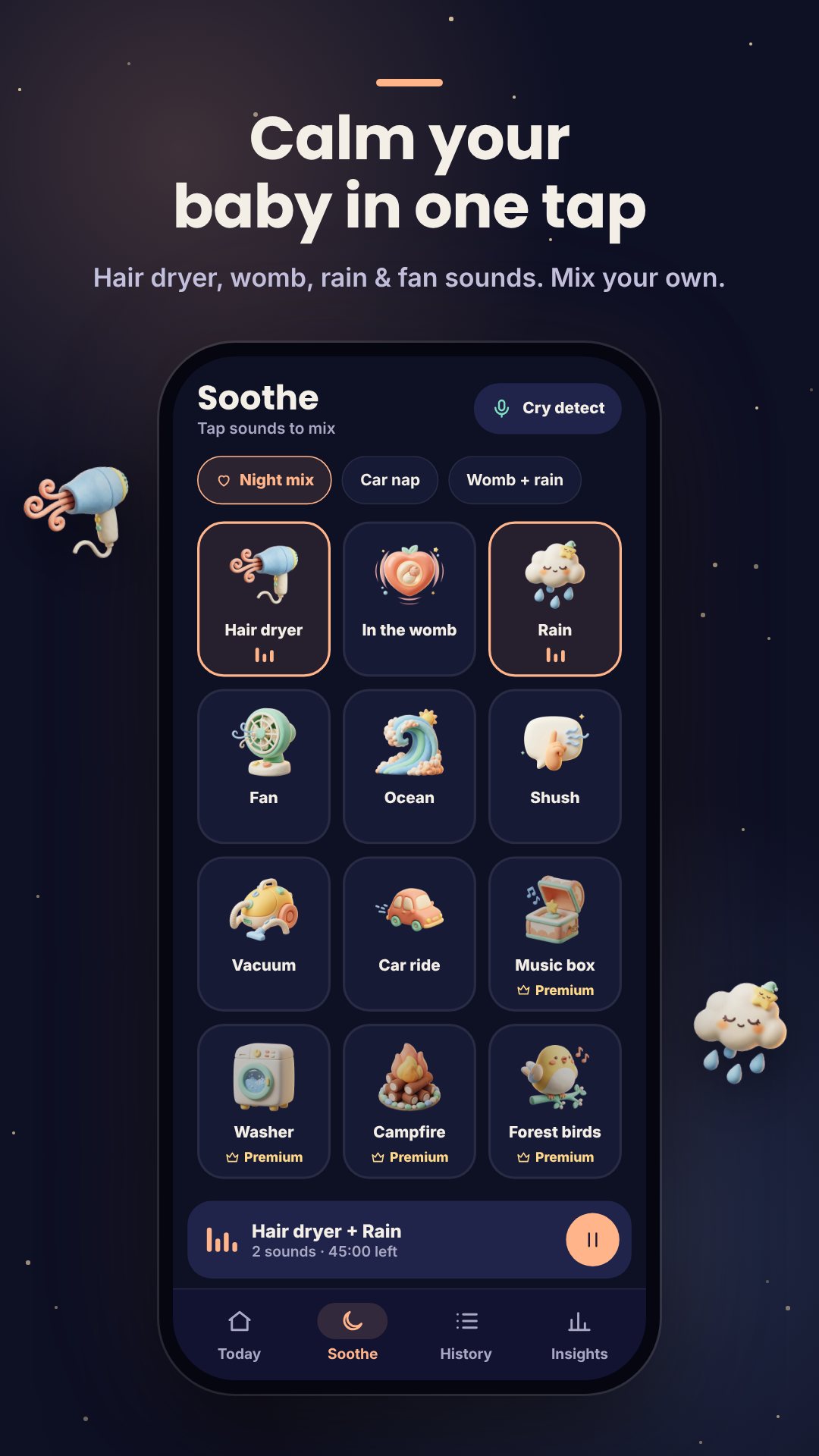
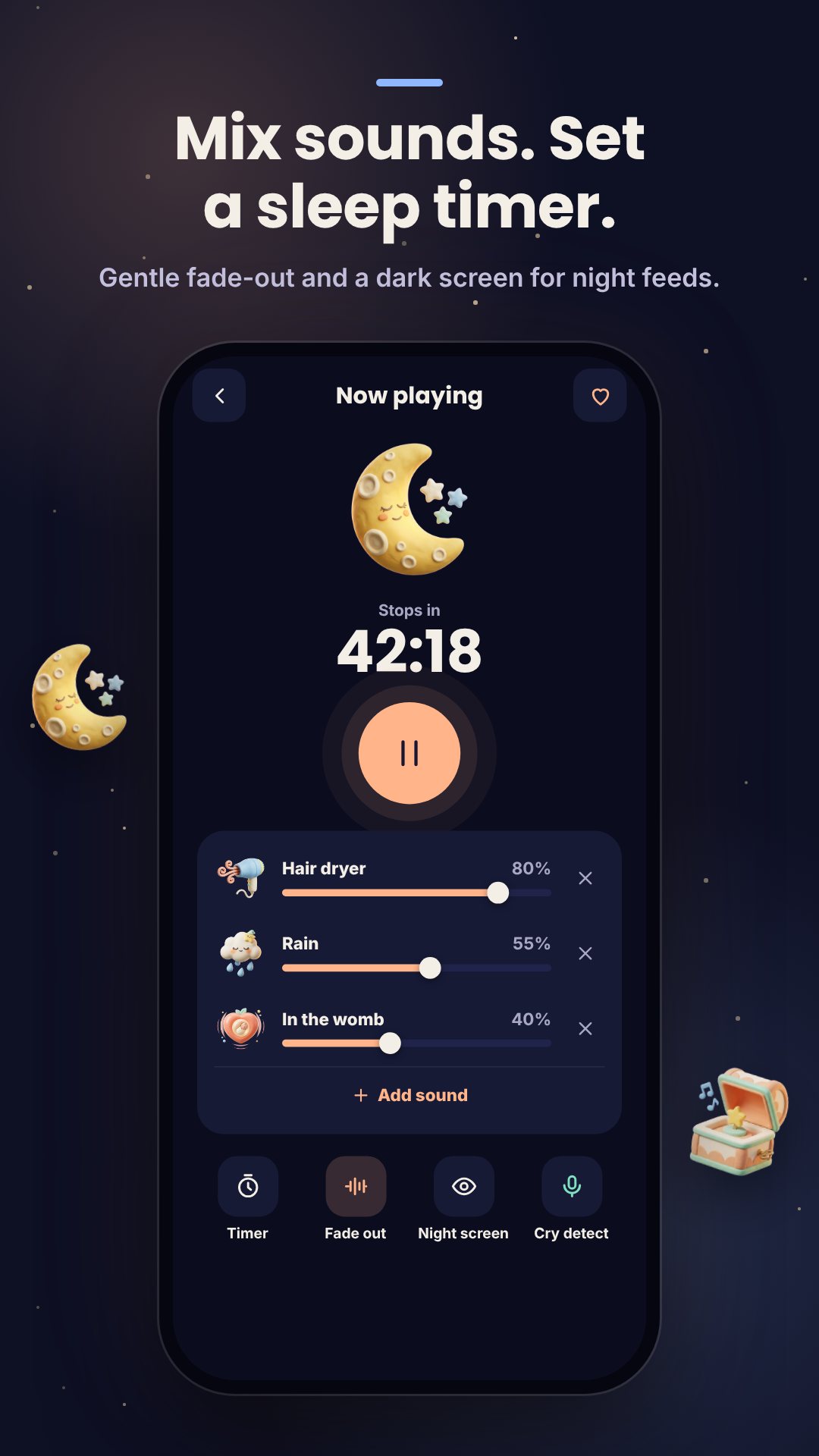
Most white-noise apps play one track. Hushaby ships 14 looping sounds — hair dryer, womb, rain, fan, ocean, shush, vacuum, car ride and more — and lets you play several at once, each with its own volume slider, to build the exact blend your baby responds to. A sleep timer stops the mix after a set time and can fade the volume down gently over the last five minutes so the quiet does not wake the baby. Your last mix is remembered for next time.
Cry detection that listens and soothes on its own
Switch on cry detection and Hushaby listens for your baby through the microphone. The analysis happens entirely on the device — audio is processed in memory in short frames and never recorded, stored or sent anywhere. When it hears a cry, it automatically starts the soothing sound you chose. You set the sensitivity to Low, Medium or High, and you can tell the app to start listening again the moment the sleep timer ends, so a baby who stirs is met with white noise before fully waking.
A dark night mode built for 3 a.m.
Night mode drops the screen to near-black with a dim, warm clock and keeps the display awake so the sounds keep playing. Leaving it takes a deliberate long-press, so a sleepy tap — or the baby's own hand — cannot stop the soothing by accident.
See the patterns, keep the data yours
The Insights tab turns your taps into something useful: a per-day view of feeds, sleep and diapers, your longest stretch of sleep, the average gap between feeds, and a weekly report. Because Hushaby is offline-first, everything lives in a local file on your phone. You can back up to a JSON file, restore it later, or export a CSV to share with your pediatrician or open in a spreadsheet.
Gentle reminders that respect quiet hours
Optional local reminders nudge you about the next feed, a pump session or a daily check-in. Set quiet hours and those reminders arrive silently so they never wake the baby, and they reschedule themselves after a reboot. There is no server behind any of this — the notifications are generated on your phone.
How to set up automatic cry soothing
- Open the Soothe tab and tap the sounds your baby likes to build a mix, adjusting each volume slider.
- Open cry detection and grant the microphone permission when asked.
- Pick the soothing sound to play when crying is detected.
- Set the sensitivity to Low, Medium or High to match your room.
- Start listening — Hushaby plays the sound on its own whenever it hears a cry.
Good to know before you start
Hushaby is free to download and supported by ads, with optional in-app purchases that unlock six extra sounds (music box, washer, campfire, forest birds, train and crib mobile) and remove the ads. The now-playing and cry screens are deliberately ad-free. The interface is available in ten languages, including English, Spanish, Portuguese, German, French, Japanese, Korean, Thai, Indonesian and Vietnamese. Hushaby is a tracking and soothing aid, not a medical or safety device, and does not replace a monitor or professional advice.
Frequently asked questions
Does Hushaby work without an internet connection?
Yes. Tracking, the sound mixer and cry detection all run on your device, and your logs are stored in a local file — no account or connection is required.
Is the microphone audio from cry detection recorded?
No. The audio is analysed in memory on your phone and is never recorded, stored or sent anywhere.
Can I export my baby's feeding and sleep data?
Yes. You can export a CSV of every logged entry and back up everything to a JSON file you can restore later.
Can I play more than one sound at a time?
Yes. Hushaby mixes several of its 14 sounds together, each with its own volume, and a timer can fade them out gently over the last five minutes.