ClinicOS: the OB-GYN clinic app that runs the room, not just the records
 By the NAXTECH team · Published 25 Jun 2026 · Updated 19 Aug 2026 · Hands-on with v1.0
ClinicOS at a glance
- What it is
- A clinic-management app for small OB-GYN and ultrasound practices.
- Platform
- Android · offline-first, with an encrypted on-device database.
- Price
- Free, with ads and optional in-app purchases.
- Core tools
- Queue · Antenatal card · Ultrasound biometry · Billing & receipts · Medical documents · Multi-device sync.
- Languages
- 18 interface languages; certificates print in Thai or English.
- Best for
- Solo doctors, duos and small teams running an OB-GYN clinic.
It is 9 a.m., the waiting room is filling up, and you are the doctor, the sonographer and — until someone pays — the cashier. Small OB-GYN clinics do not have a hospital's information system; they have a notebook, a whiteboard of queue numbers, and a calculator for the ultrasound. ClinicOS was built to be all three at once, on a phone or tablet you already own, and to keep working when the Wi-Fi does not.
ClinicOS is a clinic-management app for small OB-GYN and ultrasound practices. Everything a visit touches — the queue, the antenatal card, the scan, the bill and the printed certificate — lives in one offline-first app with an encrypted local database, so a clinic owns its data on its own devices.
Antenatal care that does the pregnancy maths for you
Add a patient's last menstrual period and ClinicOS applies Naegele's rule to set the due date (LMP + 280 days) and shows the gestational age as weeks+days with the trimester, on every visit, automatically. The antenatal card carries a default checklist timed to the pregnancy — first-trimester labs, the NT scan at 11–14 weeks, the anomaly scan at 18–22, the OGTT at 24–28, Tdap at 27–36, GBS at 35–37 and growth scans at 32–36 — and each task surfaces in the week it is due. A friendly size comparison runs alongside, from raspberry in early weeks to watermelon near term.
An ultrasound station on the same device
Open the dark-themed ultrasound screen, type the four biometry measurements — BPD, HC, AC and FL in millimetres — and ClinicOS computes the estimated fetal weight with the Hadlock formula and a rough percentile for the gestational age. Import the scan images, pick the best one, and share it straight to the mother with a tap. The measurements and EFW save to the visit so growth is tracked across appointments, not scribbled on a slip.
A queue the whole clinic can see
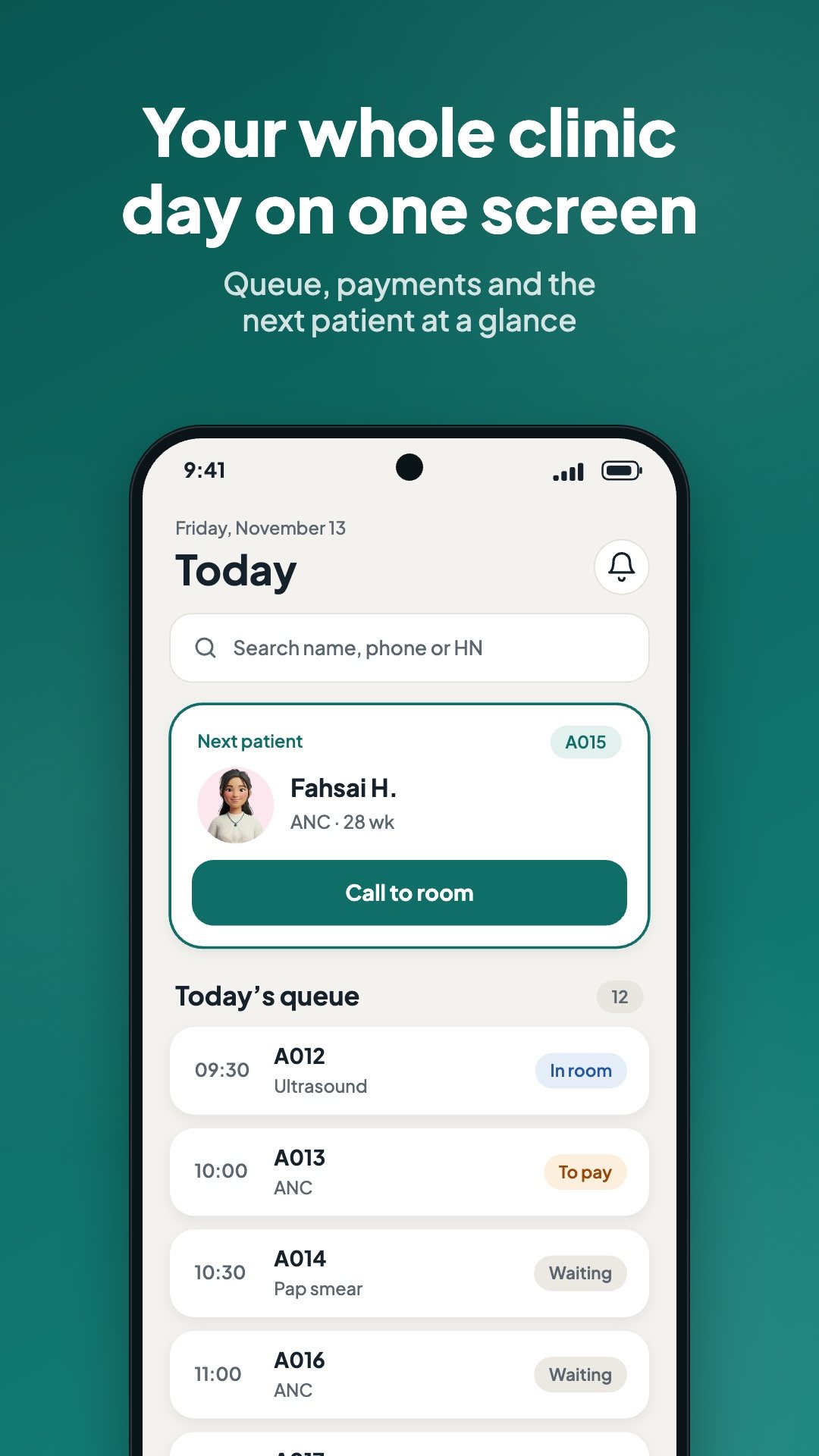
The Today screen is the live queue: register a patient, call the next number into the room, and move them through triage, exam, pay and done. Point a spare phone or TV at the waiting-room display and it shows the number now calling and the numbers next — names are never shown, and ads never appear on that screen. In a solo clinic the flow collapses so the bill opens the moment the exam ends; in a duo or a team, triage and the counter become their own stations.
Exam notes without the typing
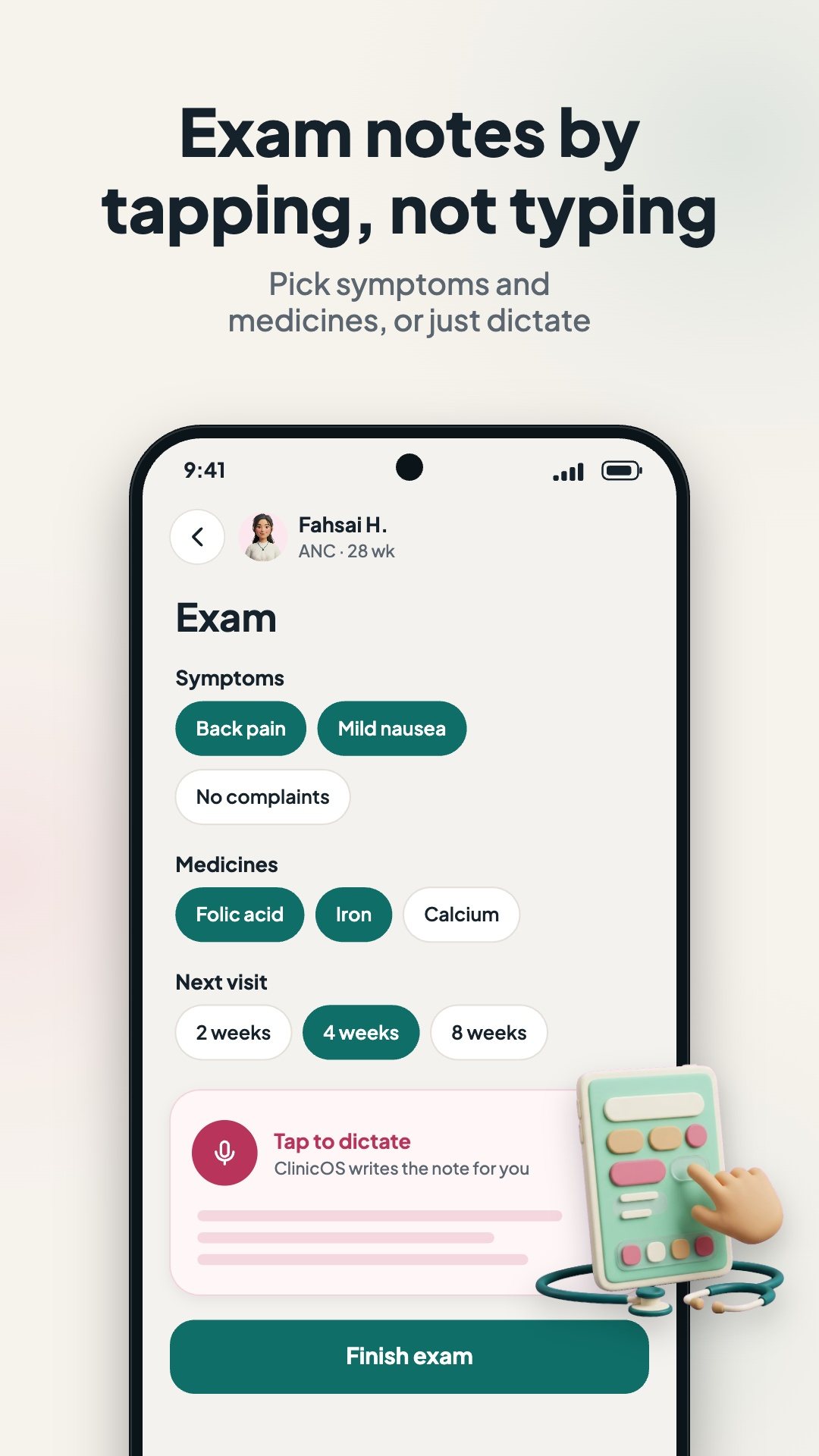
During the visit, tap symptom and medication presets, enter blood pressure and weight, or dictate the note by voice in the clinic's language. ClinicOS stitches the presets, vitals and the next-visit interval into a tidy note and books the follow-up appointment automatically.
Billing, receipts and real clinic hardware
- One-tap billing — the service fee and any medicines dispensed in the exam flow onto the bill, paid by cash, transfer, card or QR.
- Thermal receipts — print to 58 mm or 80 mm Bluetooth ESC/POS printers, rendered as an image so every one of the 18 languages prints correctly.
- Medical documents — generate medical certificates, referral letters and receipts as PDFs, in Thai or English.
- Thai ID card reader — read a patient's national ID through a USB CCID reader over OTG; the card photo is never read or stored.
How to run a first antenatal visit in ClinicOS
- On Today, add the patient to the queue and enter her last menstrual period.
- Call her number into the room — ClinicOS shows the gestational age and due date on the card.
- Record vitals and symptoms, or dictate the note, and set the next-visit interval.
- Open the ultrasound station, enter BPD, HC, AC and FL, and read the EFW and percentile.
- Finish to the bill, take payment and print the receipt or a medical certificate.
Built for more than one device
ClinicOS keeps every clinic's records in an encrypted database on the device and syncs offline-first to the clinic's own Google Sheets file, using only the drive.file scope — the app sees the files it created and nothing else in your Drive. Local changes queue in an outbox and push every few seconds while online; when two devices edit the same row at once, ClinicOS flags the conflict instead of guessing. Pair a new tablet by scanning a QR code, give each device a role — doctor, assistant, counter or waiting-room TV — and protect them with per-user PINs.
Good to know
ClinicOS is a practice-management and documentation tool for clinicians; the estimated fetal weight, percentile and dating are calculator aids based on published formulas (Hadlock, Naegele) and do not replace clinical judgement. Data lives on the clinic's devices and, if enabled, in the clinic's own Google Sheets. The app is free with ads and optional in-app purchases; ads never appear on the waiting-room display.
Frequently asked questions
Does ClinicOS work offline?
Yes. The queue, antenatal card, ultrasound and billing all run on an encrypted on-device database, and changes sync to the clinic's Google Sheets whenever a connection is available.
How does it estimate fetal weight?
Enter BPD, HC, AC and FL in millimetres and ClinicOS applies the Hadlock formula to give an EFW in grams, plus a rough percentile for the gestational age.
Can several devices in the clinic share the same records?
Yes. Pair devices with a QR code and they sync through the clinic's own Google Sheets file; conflicting edits are flagged rather than silently overwritten.
Is ClinicOS free?
Yes, it is free to download with ads and optional in-app purchases, and ads never show on the waiting-room queue display.