 By the NAXTECH team · Published 2 Jun 2026 · Updated 25 Aug 2026 · Hands-on with v1.0
It is late, the house is finally quiet, and you reach for a frequency app — only to find it is really a wrapper around a few streamed loops that stall the moment your signal drops. If you have tried to drift off to a 528 Hz tone and been interrupted by a buffering spinner or an ad that needed the network, you know the gap this app was built to close.
Solfeggio Bowl takes a different approach: every sound you hear is generated on your phone in real time, so there is nothing to download and nothing to stream. Pure Solfeggio tones, binaural and isochronic beats, four ambient soundscapes and seven singing bowls are all synthesised on device at 44.1 kHz — which is why the whole thing runs offline with no account.
The library carries 13 frequencies — the nine classic Solfeggio tones (174, 285, 396, 417, 528, 639, 741, 852 and 963 Hz) plus 111, 432, 777 and 888 Hz — and groups them by goal rather than by number, so you browse under Sleep, Calm, Focus or Wealth instead of guessing. Each tone plays as a seamless ten-second sine loop, and the wealth and luck frequencies carry an honest note that they are rooted in belief traditions, not a promise.
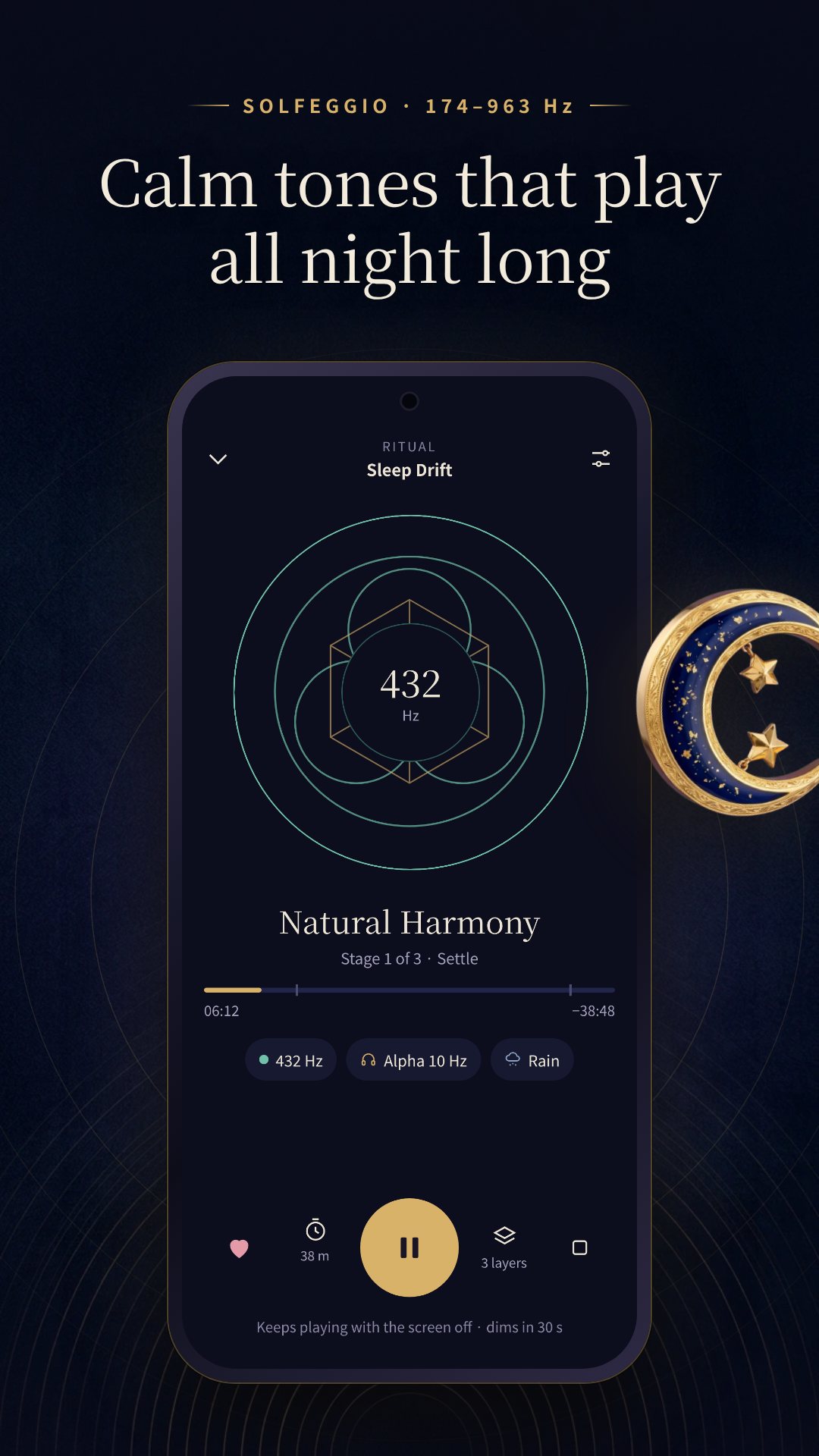
On top of any tone you can layer a brainwave beat across five bands — delta, theta, alpha, beta and gamma — in either binaural or isochronic mode. The app watches your audio output and knows when headphones are plugged in: binaural beats need both ears, so when you are on the phone's speaker it suggests the isochronic pulses that still work out loud. It is a small detail that most frequency apps skip.
The mixer stacks up to three layers — a frequency, a brainwave band and an ambient soundscape (rain, ocean, fire or forest) — each with its own volume. Changes crossfade into a session already playing, so you can tune the blend without a gap of silence, then save it as a preset to reopen later.
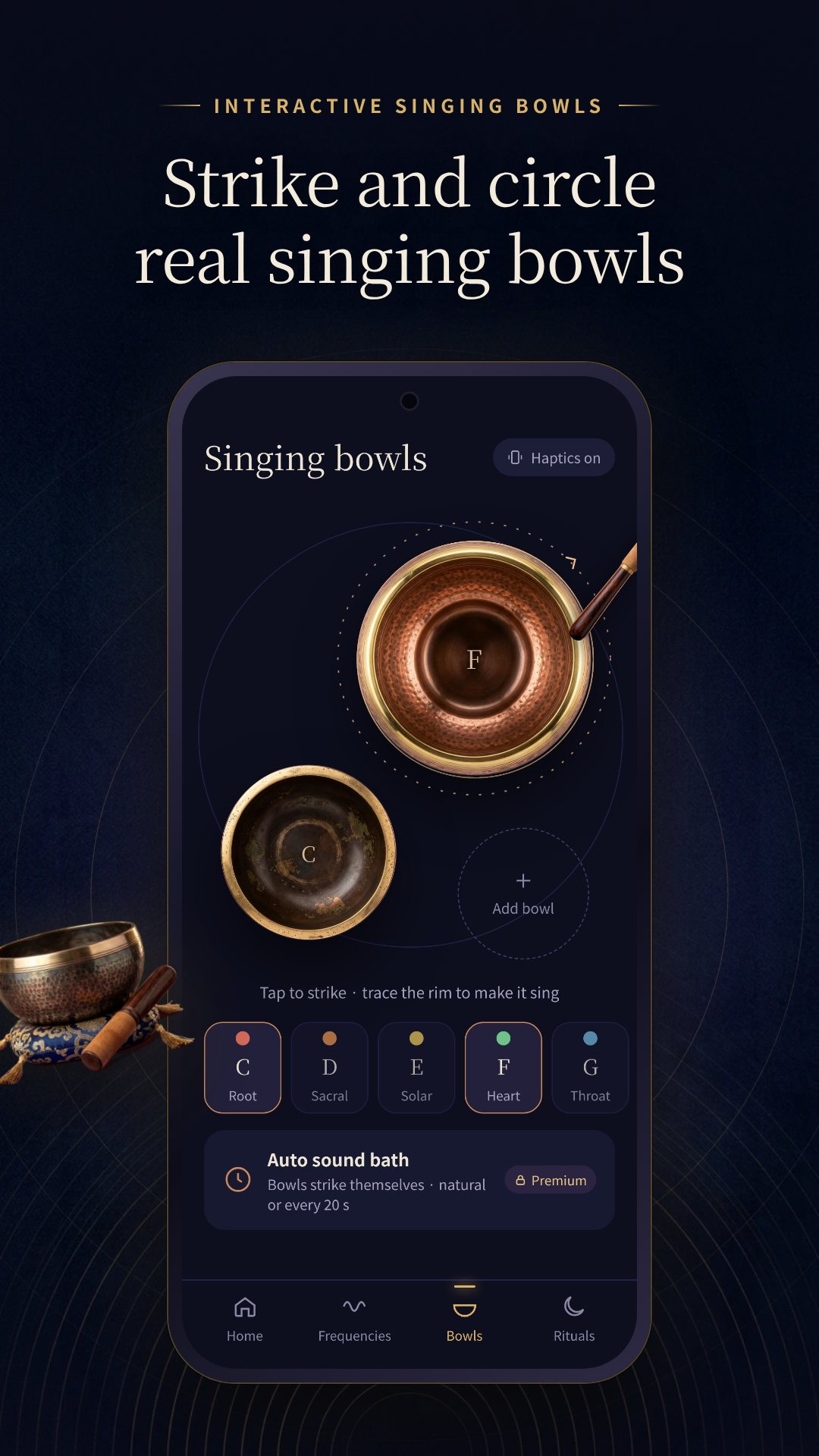
The bowls are interactive, not a recording. There are seven bowls tuned to the chakra scale, from a C root bowl at 130.81 Hz up to a B crown bowl at 246.94 Hz, cast in bronze, copper and brass. Tap a bowl to strike it, or trace its rim to make it sing, and strikes answer with a gentle haptic tick. Premium adds an automatic sound bath that strikes the placed bowls on a pace you set.
When you would rather not build a mix yourself, six guided rituals — Sleep, Morning, Reset, Focus, Bath and Unwind — run in timed stages that shift the blend as they go. The Sleep ritual, for example, settles for ten minutes on 432 Hz over rain, drifts for thirty on a deep 174 Hz delta layer, then fades. A sleep timer (15, 30, 45, 60 or 90 minutes, or "end with the ritual") stops playback for you, and daily reminders can nudge you into a morning or night session.
Sessions keep running with the screen off, with lock-screen and media-button controls through a proper media session, so a bedtime tone does not stop when the display sleeps. Premium users also get a home-screen widget that jumps straight to their favourite bowls.
Solfeggio Bowl is for relaxation and entertainment — it is not a medical device and makes no health claims. Binaural beats are felt best through headphones; on speakers, switch to isochronic mode. The app is free with ads and offers optional in-app purchases that unlock every frequency, band, bowl and ritual.
Yes. Every tone, beat, soundscape and bowl is generated on your device, so the whole app runs without a connection and without an account.
Only for binaural beats, which need both ears. The app detects your output and suggests isochronic pulses when you are on the phone's speaker.
No. The app is for relaxation and entertainment only; the wealth and luck tones come from belief traditions and are not a promise or a medical treatment.
Yes, it is free to download with ads, and offers optional in-app purchases that unlock the full set of frequencies, bands, bowls and rituals.
Get Solfeggio Bowl on Google Play →
작성 NAXTECH 팀 · 2026년 3월 6일 게시 · 2026년 6월 25일 업데이트 · v1.0 직접 사용기
밤늦게 집이 겨우 조용해졌는데, 주파수 앱을 켜 보니 결국은 몇 개의 스트리밍 음원을 감싼 껍데기라 신호가 약해지는 순간 끊겨 버린 경험. 528 Hz 음에 잠들려다 버퍼링 아이콘이나 네트워크가 필요한 광고에 깬 적이 있다면, 이 앱이 메우려는 바로 그 틈을 아실 겁니다.
솔페지오 볼은 접근 방식이 다릅니다. 들리는 모든 소리를 폰에서 실시간으로 만들어 냅니다. 내려받을 음원 파일도, 스트리밍할 것도 없습니다. 순수 솔페지오 음, 바이노럴·아이소크로닉 비트, 네 가지 환경음, 일곱 개의 싱잉볼이 모두 기기 안에서 44.1 kHz로 합성되기에 계정 없이 오프라인으로 돌아갑니다.
라이브러리에는 주파수 13종이 담겨 있습니다. 대표 솔페지오 9음(174, 285, 396, 417, 528, 639, 741, 852, 963 Hz)에 111, 432, 777, 888 Hz가 더해졌죠. 숫자가 아니라 목적으로 묶어 두어 수면·이완·집중·재물 카테고리에서 고르면 됩니다. 각 음은 이음매 없는 10초 사인파 루프로 재생되고, 재물·행운 주파수에는 "전통적인 믿음에서 비롯되었을 뿐 약속이 아니다"라는 솔직한 안내가 붙습니다.
어떤 음 위에든 뇌파 비트를 한 겹 얹을 수 있습니다. 델타·세타·알파·베타·감마 다섯 밴드를 바이노럴 또는 아이소크로닉 방식으로 재생하죠. 앱은 출력 장치를 감지합니다. 바이노럴 비트는 양쪽 귀가 필요하므로, 폰 스피커로 듣고 있으면 스피커로도 효과가 있는 아이소크로닉 펄스를 권합니다. 많은 주파수 앱이 놓치는 작은 배려입니다.
믹서는 최대 세 겹 — 주파수, 뇌파 밴드, 환경음(빗소리·파도·불·숲) — 을 각각의 볼륨으로 쌓습니다. 이미 재생 중인 세션에 변경 사항이 크로스페이드로 녹아들어, 소리가 끊기는 공백 없이 조합을 다듬을 수 있습니다. 마음에 드는 조합은 프리셋으로 저장해 다시 열 수 있습니다.
싱잉볼은 녹음이 아니라 상호작용형입니다. 7차크라 음계에 맞춘 일곱 개의 볼이 있는데, 루트에 해당하는 C 볼 130.81 Hz부터 크라운에 해당하는 B 볼 246.94 Hz까지 청동·구리·황동으로 빚었습니다. 탭하면 볼이 울리고, 테두리를 문지르면 노래하듯 소리가 이어집니다. 두드릴 때마다 부드러운 진동이 답합니다. 프리미엄에서는 배치한 볼을 설정한 간격으로 자동으로 울리는 사운드 배스가 더해집니다.
직접 조합하기 번거로운 날에는 여섯 가지 가이드 리추얼 — 수면, 모닝, 리셋, 집중, 배스, 언와인드 — 이 시간에 따라 단계적으로 조합을 바꿔 가며 흘러갑니다. 예컨대 수면 리추얼은 처음 10분은 빗소리 위에 432 Hz로 가라앉히고, 30분간 깊은 174 Hz 델타 층으로 잠겨 든 뒤 서서히 사라집니다. 수면 타이머(15·30·45·60·90분, 또는 "리추얼이 끝나면")가 재생을 멈춰 주고, 매일 알림이 아침이나 밤 세션으로 이끌어 줍니다.
화면이 꺼져도 세션은 계속되고, 미디어 세션을 통해 잠금화면과 미디어 버튼으로 제어할 수 있어 잠들기 전 틀어 둔 음이 화면이 꺼졌다고 멈추지 않습니다. 프리미엄 사용자는 즐겨 찾는 볼로 바로 이동하는 홈 화면 위젯도 쓸 수 있습니다. 광고와 선택적 구매를 빼면 인터넷이 필요한 곳은 없습니다.
솔페지오 볼은 휴식과 즐거움을 위한 앱입니다. 의료 기기가 아니며 어떤 건강 효과도 주장하지 않습니다. 바이노럴 비트는 이어폰으로 들을 때 가장 잘 느껴지고, 스피커에서는 아이소크로닉 방식으로 바꾸세요. 앱은 광고와 함께 무료이며, 모든 주파수·밴드·볼·리추얼을 여는 선택적 인앱 구매를 제공합니다.
네. 모든 음, 비트, 환경음, 볼을 기기에서 직접 만들기 때문에 연결이나 계정 없이 전체 앱이 작동합니다.
양쪽 귀가 필요한 바이노럴 비트에만 필요합니다. 앱이 출력 장치를 감지해 스피커로 들을 때는 아이소크로닉 펄스를 권해 줍니다.
아니요. 이 앱은 휴식과 즐거움을 위한 것이며, 재물·행운 음은 전통적인 믿음에서 비롯되었을 뿐 약속이나 치료가 아닙니다.
네, 광고와 함께 무료로 내려받을 수 있고, 전체 주파수·밴드·볼·리추얼을 여는 선택적 인앱 구매를 제공합니다.