Netshift: see what a travel nurse contract really pays
 By the NAXTECH team · Published 16 Jul 2026 · Updated 2 Oct 2026 · Hands-on with v1.0

Netshift at a glance
- What it is
- A take-home pay and contract comparison tool for travel nurses.
- Platform
- Android · works fully offline, no account needed.
- Price
- Free, with ads and an optional Pro subscription.
- Core tools
- Offer compare · 12-hour shift calendar · overtime engine · pay-stub check · GSA per diem · tax-home test · year report.
- Coverage
- All 50 states plus DC, with each work state's income-tax and overtime rules.
- Best for
- Travel nurses weighing contracts and tracking what they actually keep.
A recruiter texts you "$3,000 a week" and you still have no idea whether it beats the contract you are already working. The blended number hides everything that matters — how much is taxable wage, how much is tax-free stipend, what your work state takes, and what rent eats on the other side. Netshift was built to turn that one fuzzy figure into the number you take home.
Netshift is a travel-nurse pay calculator that models a contract the way the IRS and the FLSA actually treat it: federal income tax, FICA, your work state's tax, overtime by that state's rules, and local rent against the stipend. Everything runs on the phone, with no account.
Compare two offers by what you actually keep
Put two contracts side by side. Netshift computes each after federal income tax, FICA and the work state's tax, and — with one toggle — subtracts local rent so the stipend is measured honestly rather than counted as pure profit. You get a weekly and an hourly take-home figure for each, so a lower rate in a no-income-tax state like Texas, Florida or Nevada can clearly beat a bigger headline number in California. The free plan compares two offers a month; Pro makes it unlimited.
A 12-hour shift calendar that knows the overtime rules
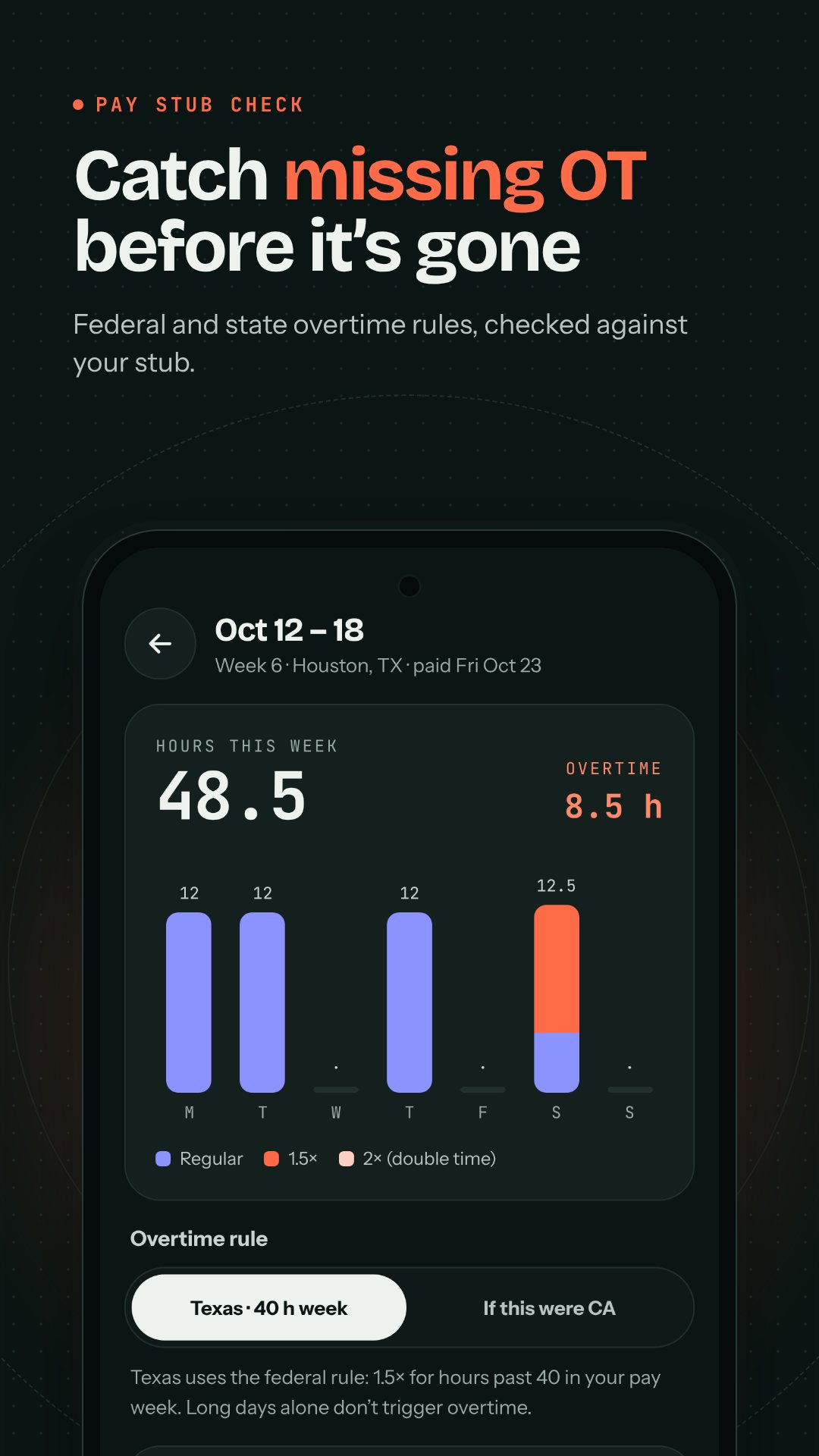
Tap a day to log a day, night or on-call shift, and Netshift prices it with your night differential, charge differential and any holiday multiplier. Overtime is where most calculators quietly cheat — this one follows the work state's own rule. California pays 2× past 12 hours in a day and 1.5× past 40 in a week; Colorado adds daily and consecutive-day thresholds; Alaska kicks in after 8 hours. Premiums use the FLSA "regular rate," so your differentials are folded into the overtime rate the way the law requires, not left out.
Check your pay stub, then the whole year
Paste the gross from your stub into the week view and Netshift shows the gap against what it expected, with a per-day bar splitting straight time, overtime and double time — the fastest way to catch a missed OT hour or a differential the agency forgot. At year end, Pro exports an earnings-by-state PDF listing wages, tax-free stipends and weeks worked per state for your tax preparer.
Tax-free stipends, done right
Two tools keep the stipend honest. The GSA per diem lookup searches by city, county or ZIP and shows the maximum tax-free lodging and M&IE an agency can pay you — and it refreshes itself each federal fiscal year. The tax-home test walks you through the IRS Rev. Rul. 73-529 three-factor test, scoring your situation as Strong, Gray zone or At risk so you know whether those stipends would survive an audit.
Paste a job post and see the take-home
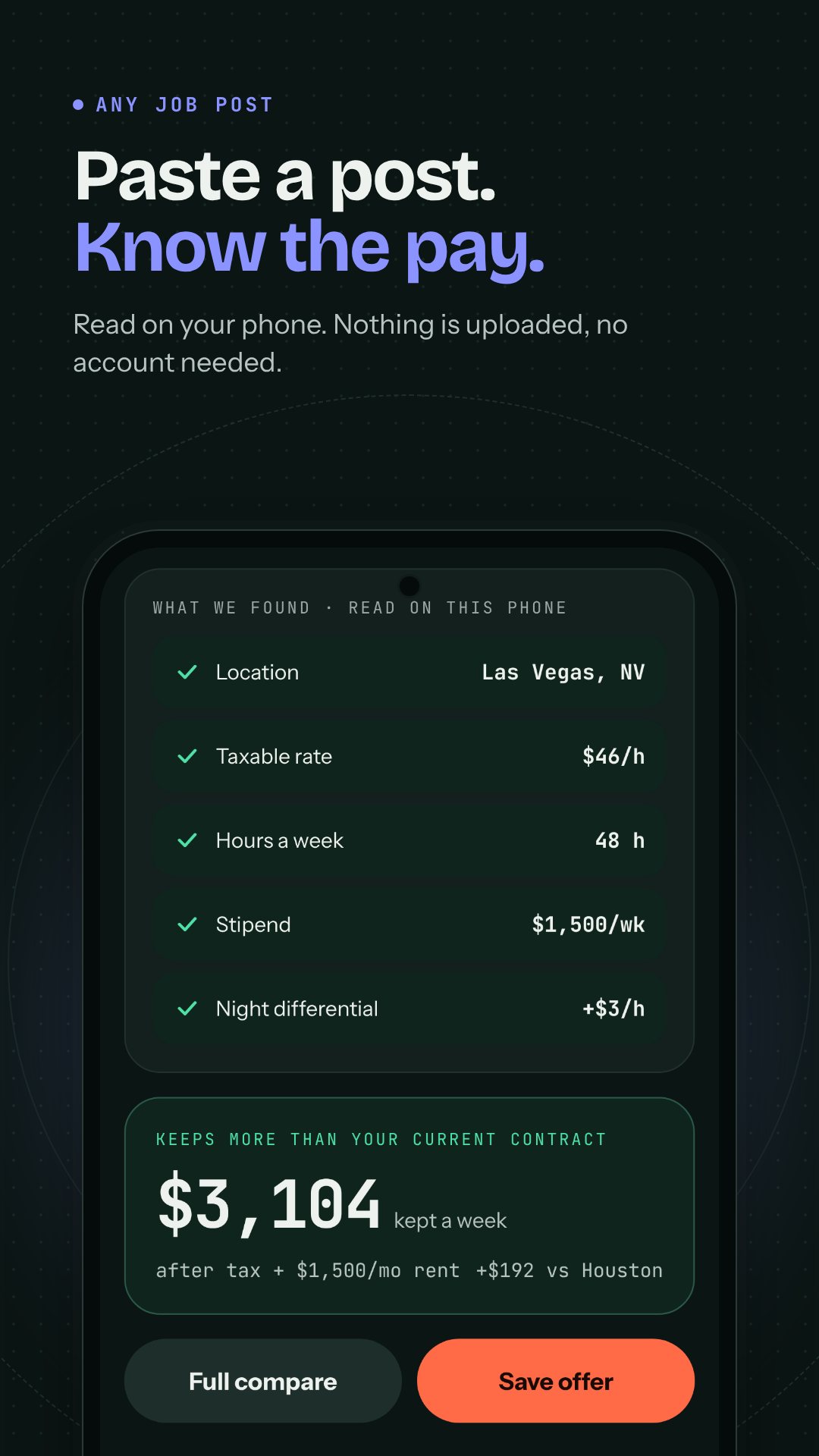
Share any listing or recruiter text straight into Netshift from the Android share sheet and its on-device parser pulls out the base rate, weekly hours (it reads "4x12" or "48 hrs/wk"), stipend, night differential and contract length — no typing. Pro users can instead photograph the offer letter and let on-device OCR fill the fields. The jobs feed then ranks openings by what you would actually keep, with filters for no-income-tax states and contracts starting soon.
How to compare two travel contracts in Netshift
- Add your current contract — or paste a recruiter text — so the app has your baseline take-home.
- Add the second offer, or scan the offer letter with your camera to auto-fill the pay fields.
- Open Compare and pick the two offers you want side by side.
- Keep Subtract rent on so housing cost counts against the stipend.
- Read the after-tax, after-rent weekly and hourly figures to see which contract truly pays more.
Built to stay on your phone
There is no sign-up and no cloud: contracts, shifts and settings live on the device, and the math runs offline so you can price an offer in a hospital basement with no signal. Home-screen widgets show this week's pay, your next shift and a quick-log button. Netshift is free with ads; an optional Pro subscription removes ads and unlocks offer-letter scanning, unlimited comparisons and the year report, billed through Google Play. It gives estimates to help you compare contracts and spot mistakes — not tax, legal or financial advice.
Frequently asked questions
Does Netshift work offline?
Yes. All pay, tax and overtime math runs on your phone with no account, so your contract numbers never leave the device.
Which taxes does it estimate?
Federal income tax, FICA (Social Security and Medicare) and your work state's income tax, and it flags the states with no wage income tax.
How is overtime calculated?
It applies your work state's daily and weekly rules using the FLSA regular rate, so night and charge differentials are included in the overtime premium.
Is Netshift free?
Yes, it is free with ads; an optional Pro subscription removes ads and unlocks offer-letter scanning, unlimited comparisons and the year-end state report.