BaZi Pro: a shift calendar and overtime tracker that actually does the pay math
 By the NAXTECH team · Published 10 Oct 2026 · Updated 26 Oct 2026 · Hands-on with v1.0
BaZi Pro at a glance
- What it is
- A shift-work calendar and overtime pay tracker for rotating rosters.
- Platform
- Android · works fully offline, no account needed.
- Price
- Free, with ads and an optional Premium unlock.
- Core tools
- Rotation patterns · Morning/Afternoon/Night shifts · Clock-in timer · OT & holiday pay · PDF/CSV export · home-screen widgets.
- Pay models
- Monthly salary, daily wage or hourly rate — with a custom pay-cycle cut-off.
- Best for
- Nurses, security guards, factory and retail staff on rotating shifts.
It is the 26th of the month, payday is coming, and you are squinting at a paper roster trying to work out how many night shifts you pulled, how much overtime that was, and what should actually land in your account. If you work a rotating roster, that monthly guessing game is the real problem — and it is the one BaZi Pro was built to end.
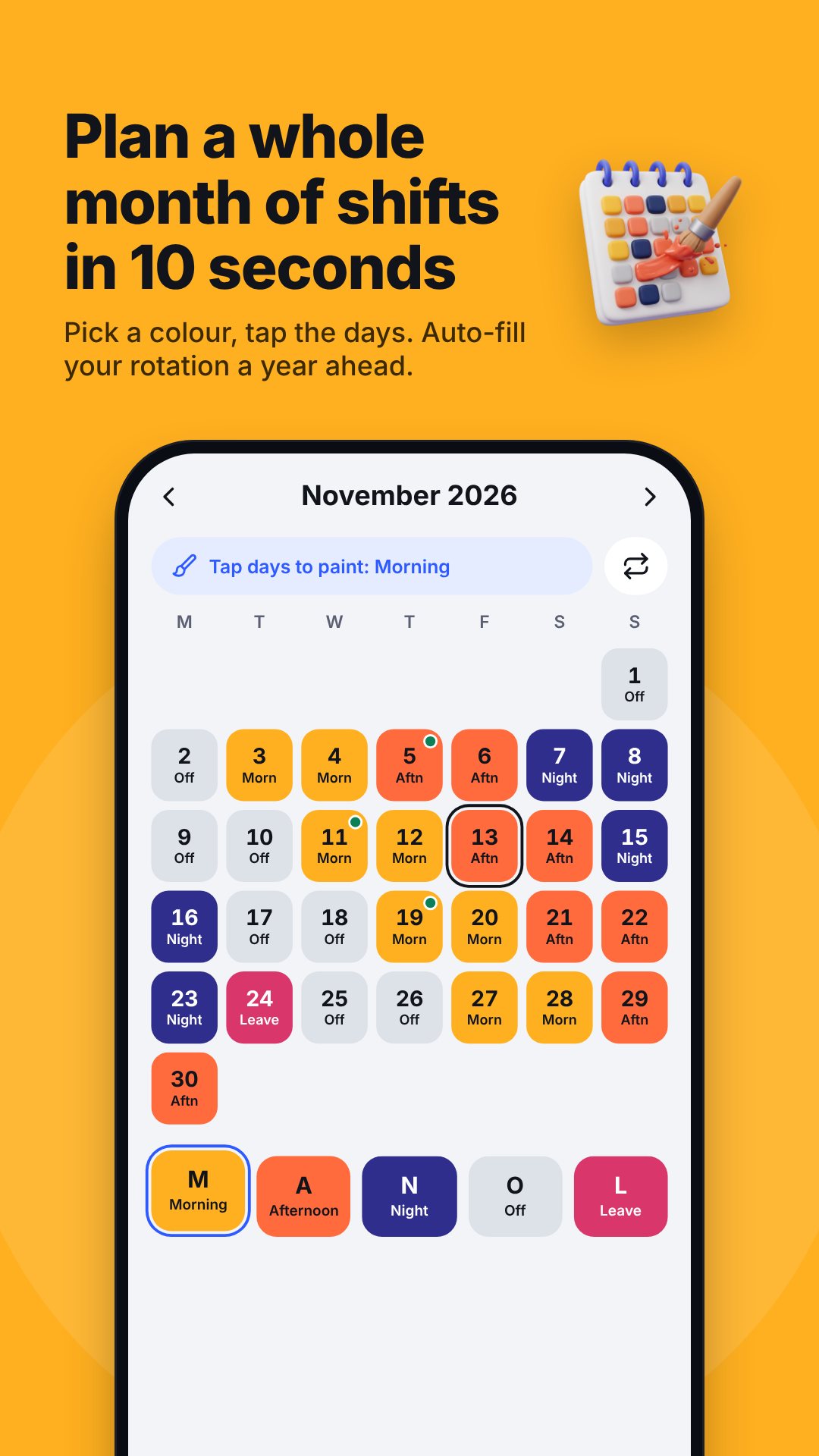
BaZi Pro is a shift calendar and overtime calculator in one. You tell it your rotation and your pay rate once; from then on it paints your month in colour, counts your hours, and keeps a live estimate of what you have earned. Everything runs on the device — no account, no sign-in, and your roster and pay never leave your phone.
Set your rotation once, fill the whole quarter
Instead of tapping in every day, you build a repeating pattern and let the app roll it forward up to 91 days at a time. Five ready-made templates cover the common cases — a nurse 8-day cycle (M·M·A·A·N·N·O·O), 4-on-4-off, a security 2-2-3 guard rotation, a two-crew factory pattern, and a Mon–Fri office week — or you can hand-build any sequence of your own. Manual edits you have already made can be preserved when a new pattern is applied.
Shifts you define, down to the allowance
The app ships five shift types — Morning, Afternoon, Night, Off and Leave — and you can recolour them, change the short label shown on each calendar chip, set the start time and length, and attach a per-shift allowance (handy for a fixed night-shift top-up). Each work shift carries its own alarm, so a late-night start wakes you the same way an early one does.
Pay math that matches your contract
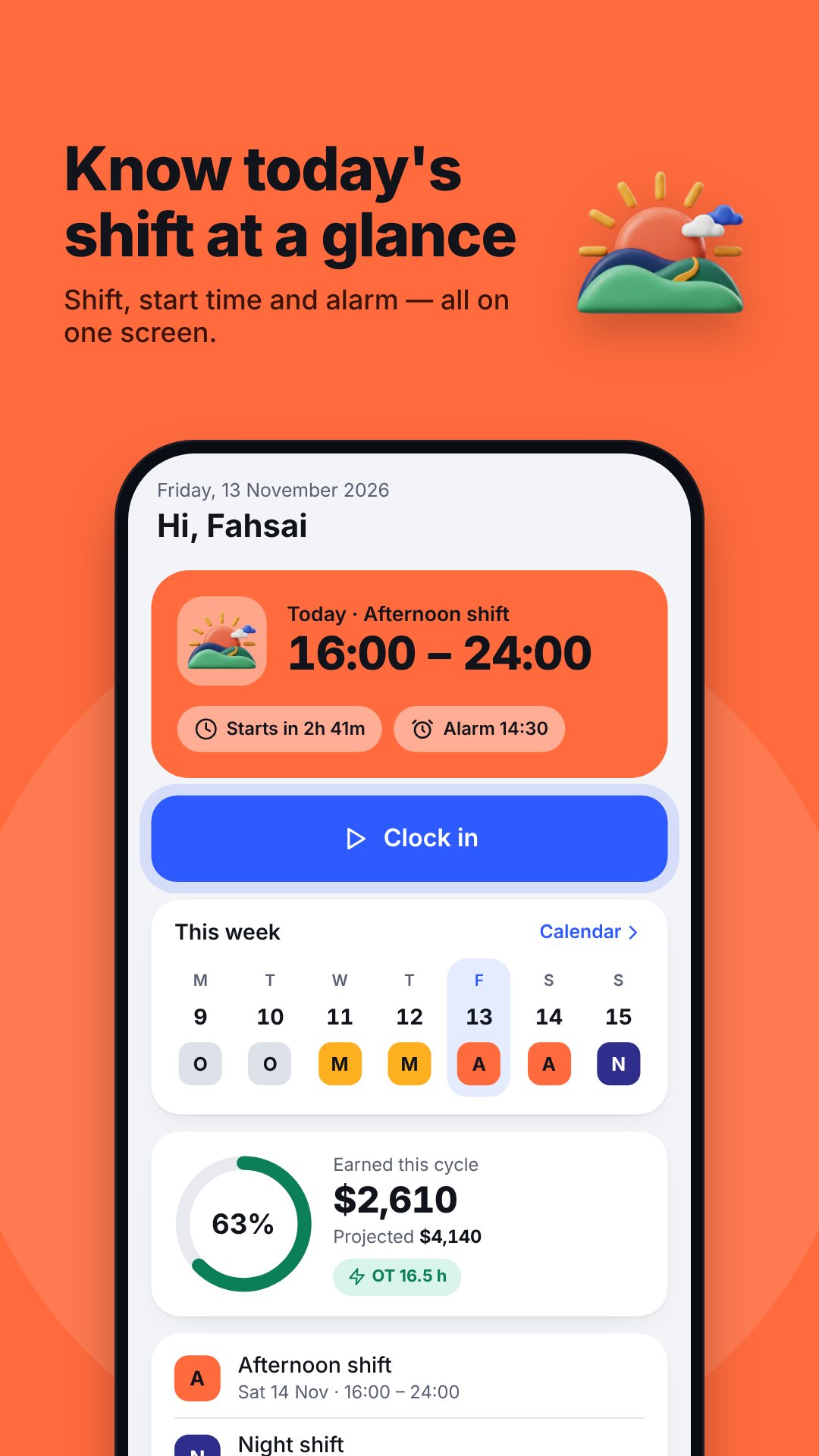
BaZi Pro calculates pay the way a payslip really works. Choose monthly, daily or hourly pay, set your overtime multiplier (1.5× by default), and separate holiday and holiday-overtime rates for public holidays. It splits each clocked day into normal and overtime hours against the planned shift length, applies a social-security deduction with your own percentage and cap, and settles everything on a pay-cycle cut-off day — so a cycle can run the 26th to the 25th rather than the calendar month. The home screen shows an animated net estimate and the change versus last cycle.
A one-tap clock for the hours you actually work
Rostered hours and worked hours are rarely identical, so there is a live stopwatch: clock in, take a break that pauses the count, and clock out. While you are on the clock a persistent notification keeps the timer in view, and the app can sound an alert the moment you cross into overtime.
Proof on paper, and glances on your home screen
- Export a timesheet as PDF or CSV for a month, a pay cycle or any custom date range.
- Home-screen widgets for today's shift, current earnings, the week and the month (Premium).
- Compare months side by side to see how your pay is trending.
- Backup & restore your data to a file, with optional auto-backup.
- Safety checks that flag short rest gaps under 11 hours between shifts and your longest run of consecutive days.
How to set up BaZi Pro for your roster
- Open Pattern and pick a template — nurse, 4-on-4-off, guard, factory or office — or build your own sequence.
- Set the start date and roll the rotation forward to fill the calendar.
- In Pay settings, choose monthly, daily or hourly and enter your rate, OT multiplier and cut-off day.
- On a work day, tap Clock in, pause for breaks, and Clock out to log real hours.
- At payday, open the pay screen or Export a PDF/CSV timesheet for the cycle.
Good to know before you start
BaZi Pro works entirely offline and keeps your roster and pay on the device — the only network use is for ads and verifying the Premium purchase. Shift alarms rely on exact-alarm and notification permissions, so grant those for reliable wake-ups. The pay figures are an estimate to help you plan; always check your official payslip. The app is free with ads, and Premium removes them while unlocking widgets, unlimited export and month comparison.
Frequently asked questions
Does BaZi Pro work offline?
Yes. Your calendar, pay settings and timesheets are stored on the device, so you can plan a roster and check earnings with no connection.
Which pay models does it support?
Monthly salary, daily wage and hourly rate — each with its own overtime multiplier, holiday rates and an optional social-security deduction.
Can I export my hours for payroll?
Yes. You can export a timesheet as a PDF or CSV for a month, a pay cycle or a custom date range.
Is BaZi Pro free?
Yes, it is free to download with ads. An optional Premium unlock removes ads and adds home-screen widgets, unlimited export and month comparison.