 By the NAXTECH team · Published 13 Apr 2026 · Updated 27 Jul 2026 · Hands-on with v1.0

You are at the counter, the cashier is waiting, and the only question that matters is a simple one: if I buy this, how much does the government cover and how much comes out of my own pocket? Under the ไทยช่วยไทย พลัส (60/40) scheme the state pays 60% and you pay 40% — but only up to ฿200 of help a day and ฿1,000 a month, and the unused part never rolls over. Doing that math in your head, in line, while the daily cap quietly runs down, is exactly where people overspend or leave benefit on the table.
ไทยช่วยไทย คำนวณ 60/40 was built to answer that question before you tap to pay. Type an amount and it splits the bill instantly, checks it against what is left of your daily and monthly allowance, and keeps a running tally of what you have saved — all on your phone, with no account and no connection required.
The calculator has two modes. In "from the price" (จากยอดสินค้า) you enter the price of the item and see the state's 60% and your 40% side by side. In "from the cash you have" (จากเงินที่มี) you enter the money in your wallet and the app tells you the largest purchase you can make — because your 40% has to come from somewhere. Entry is through a built-in number pad, not the system keyboard, so big amounts are quick to tap in.
Crucially, the result is not a naive 60/40. The app knows the official ceilings — ฿200 of state help per day and ฿1,000 per month — so when a purchase would push you past what is left, it caps the state's share and warns you that the overflow is yours to pay. The most the state ever covers in a single day tops out at a ฿333.33 purchase (฿200 ÷ 0.6).
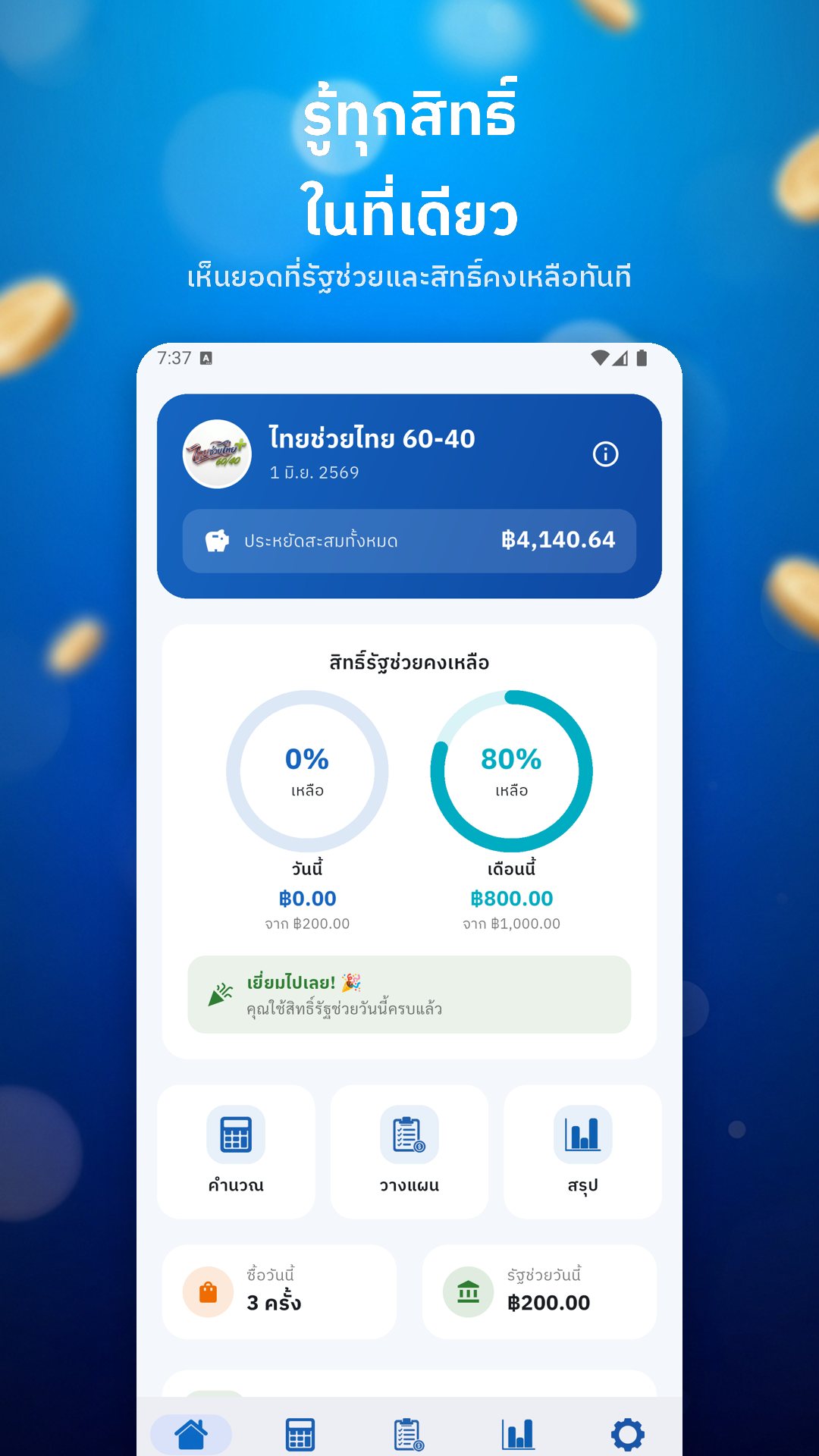

The home dashboard turns your remaining rights into two allowance rings — one for today against the ฿200 cap, one for this month against the ฿1,000 cap — so a glance tells you whether there is room for one more purchase. It adds up your total savings so far, and counts down the days to the next installment, when a fresh ฿1,000 lands at the start of the month, noting which of the four installments is coming.
The Plan tab lets you list what you intend to buy each day — a morning coffee, lunch, that errand — tag each with a category, and attach a daily reminder so you do not forget to use the benefit before the window closes. When you actually buy the item, one tap turns a plan line into a logged purchase. Every save lets you add a note and a category — food, drink, goods or service — and confirms the state share, your share, and the allowance left afterwards.
The Summary tab keeps your purchases grouped by day, with a seven-day bar chart of the state help you have collected, and stat cards for savings this month and in total. Everything is stored locally on the device, so your spending record never leaves your phone, and you can clear the whole history whenever you want.
Beyond the math, the app carries a plain-language brief on the scheme itself: who qualifies, how to register through the เป๋าตัง app and G Wallet, which goods are excluded, and the key dates — which you can drop straight into your device calendar so registration day does not slip past. Daily and month-end notifications nudge you to spend the benefit before it expires.
ไทยช่วยไทย คำนวณ 60/40 is an independent helper for planning and tracking — it is not an official government app, does not connect to เป๋าตัง or G Wallet, and does not spend your benefit for you. The actual transaction still happens in the official app; this tool just makes sure the numbers are on your side first. It is free and supported by ads.
Yes. The calculator, allowance tracking, plans and history all run on your device, with no account and no internet connection needed.
No. It only calculates and tracks; you still make the real purchase in the official เป๋าตัง app with G Wallet.
It limits the state's share to what is left of your ฿200 daily and ฿1,000 monthly allowance, and warns you when a purchase goes over.
Yes, it is free to download and supported by ads.