 Por el equipo de NAXTECH · Publicado el 8 sept 2026 · Actualizado el 30 sept 2026 · Probada en la v1.0
Te prometiste que esta vez sí rezarías la novena completa — nueve días, sin fallar ninguno — y para la tercera noche ya no recuerdas si hoy rezaste o por qué día vas. Ahí es donde casi todas las novenas se quedan a medias. Novenas Milagrosas nació de una idea sencilla: una novena son nueve días seguidos, así que todo el trabajo de la app es llevarte del Día 1 al Día 9 sin dejar que se te pase ni uno.
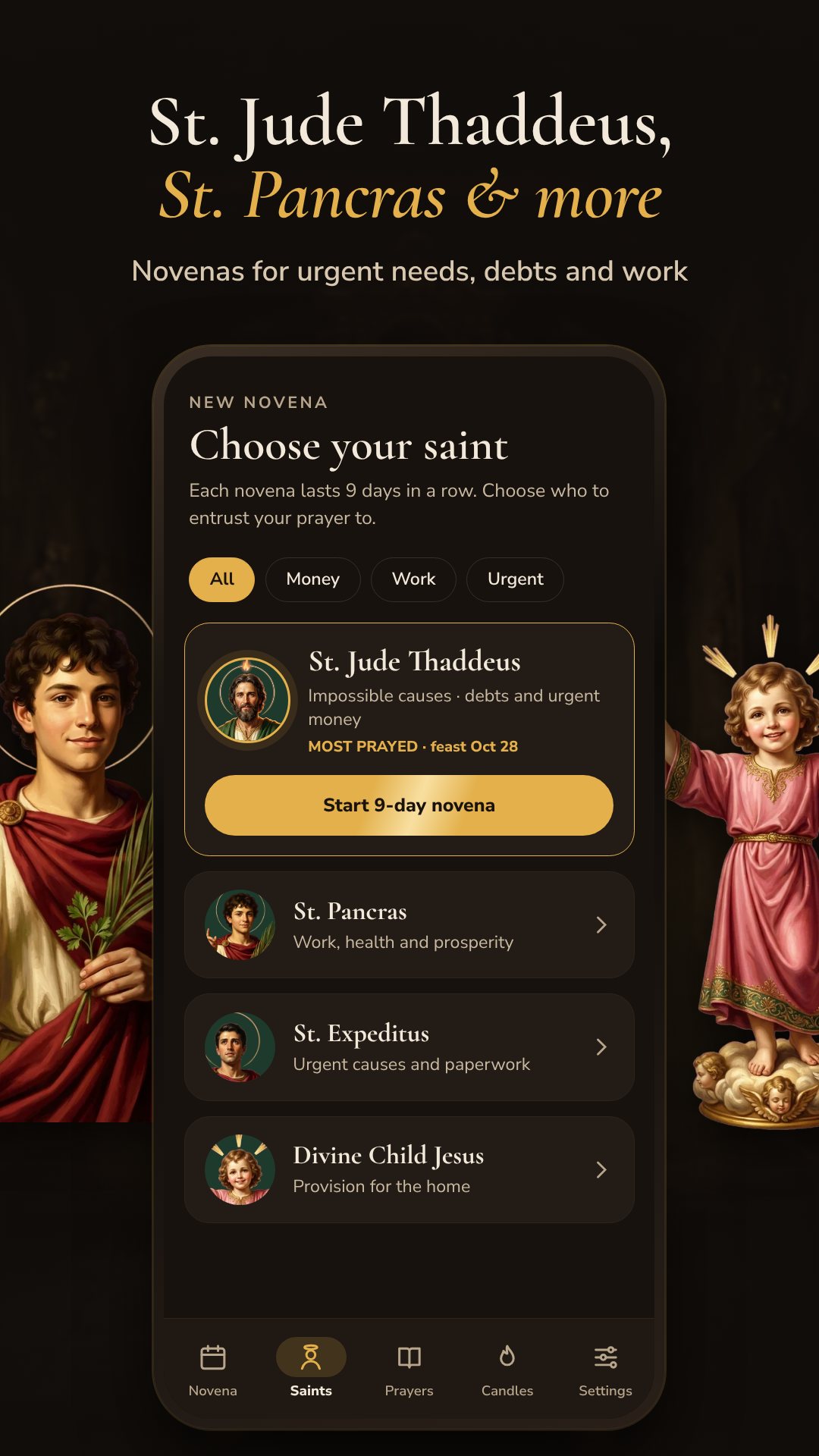
Empiezas eligiendo a quién le encomiendas tu petición. La app trae cuatro santos, cada uno con su patronazgo: San Judas Tadeo, patrón de las causas imposibles, las deudas y el dinero urgente, y el más rezado de los cuatro; San Pancracio para el trabajo, la salud y la prosperidad; San Expedito para las causas urgentes y los trámites; y el Divino Niño Jesús para la provisión del hogar. Un filtro te deja acotar la lista a Dinero, Trabajo o Urgente para encontrar rápido al santo indicado.
Cada uno de los nueve días sigue la misma estructura tradicional, ya armada para ti para que no tengas que montarla por tu cuenta: una oración inicial que se reza cada día, la oración del día, una breve reflexión, la terna de Padrenuestro, Avemaría y Gloria con un contador 1/3, 2/3, 3/3, y la oración final. Un día completo toma unos quince minutos. Al terminar pulsas Marcar día como completado y la app te dice cuántos días te faltan.
El lector está hecho para rezar de verdad, no solo para leer. Una voz que lee en alto te recita las oraciones, el texto se desplaza solo a un ritmo que puedes seguir con las manos libres, y la pantalla se mantiene encendida durante toda la oración para que no se apague a mitad del rezo. Puedes aumentar el tamaño de la letra para leer con comodidad y ajustar la voz y su velocidad en Ajustes. Todo funciona sin conexión, así que un apagón o la falta de señal nunca te interrumpen.
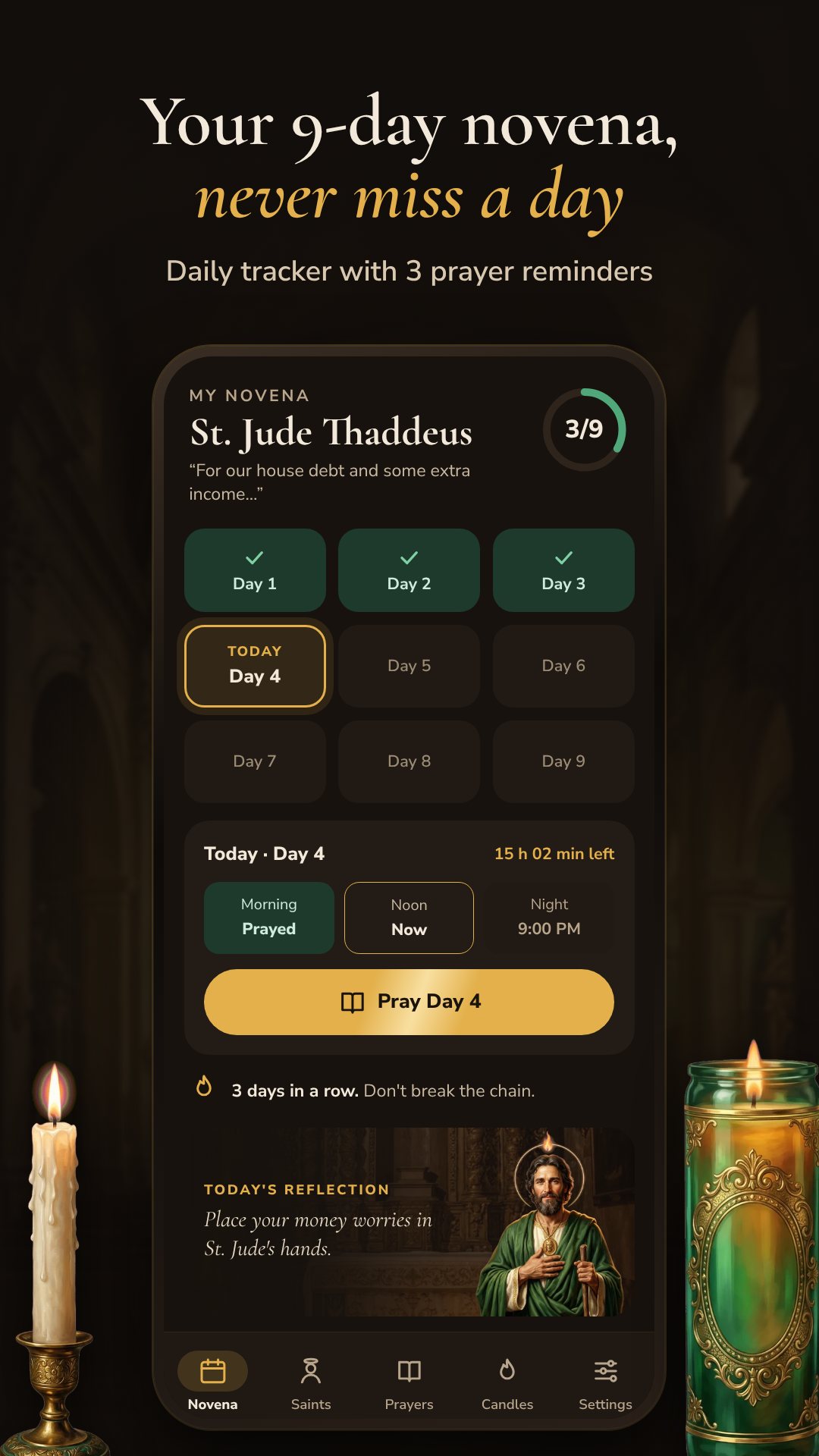
Este es el corazón de la app. Novenas te manda tres recordatorios al día — mañana ("ofrece tu día"), mediodía ("reza la oración del día") y noche ("última llamada antes de medianoche") — y esos avisos sobreviven a reiniciar el teléfono. Si dejas pasar un día entero, la app es fiel a la tradición: la cadena se rompe y vuelves a empezar desde el Día 1, con una nota amable en lugar de un reproche. Un contador de racha te mantiene a la vista los días seguidos para que el impulso haga el trabajo.
Antes del Día 1 escribes tu petición — la app te sugiere categorías como Deudas, Dinero urgente, Trabajo, Negocio, Familia y Salud — y esa intención se guarda solo en tu teléfono. Se te lee al comienzo de cada día para que tu oración siga apuntando a aquello por lo que de verdad viniste a pedir. No se sube nada a ningún lado; no hay cuenta que crear.
La pestaña Velas y ofrendas es un pequeño altar digital. Puedes encender una vela blanca gratis cada día; las velas verdes, las rosas y el incienso se desbloquean viendo un breve video de recompensa. Una ofrenda encendida titila en el altar del santo durante 24 horas, llevando contigo tu intención, y la app cuenta cuántas velas has encendido en esta novena. Junto al seguimiento hay una biblioteca de oraciones con una "oración del día" que va rotando y lo básico — Padrenuestro, Avemaría y Gloria — siempre a mano. Una pantalla de historial guarda cada novena anterior, con su santo, su intención y si llegaste a los nueve días.
Novenas es una ayuda devocional: presenta oraciones católicas tradicionales para uso personal y espiritual, y no sustituye el consejo profesional en temas de salud, legales o económicos. La app es gratuita y contiene anuncios, con videos de recompensa opcionales que desbloquean más velas. La voz que lee en alto usa el motor de texto a voz de tu teléfono, así que si no tienes ninguna voz instalada puedes añadir una en los ajustes del sistema.
Sí. Las oraciones, las reflexiones, los recordatorios y el altar de velas funcionan en tu dispositivo, así que puedes rezar sin conexión.
Una novena se reza nueve días seguidos, así que si te saltas un día el seguimiento vuelve a empezar desde el Día 1 — para eso están los tres recordatorios diarios.
A San Judas Tadeo, San Pancracio, San Expedito y el Divino Niño Jesús, cada uno con sus oraciones para intenciones de dinero, trabajo, urgencia y hogar.
Sí. Tu petición se guarda solo en tu teléfono y nunca se sube; la app no necesita ninguna cuenta.
Descarga Novenas en Google Play →
By the NAXTECH team · Published 9 Jul 2026 · Updated 20 Sept 2026 · Hands-on with v1.0
You promised yourself you would pray the full novena this time — nine days, no gaps — and by the third evening you cannot remember whether you already prayed today, or which day you are on. That is where most novenas quietly fall apart. Novenas was built around one simple idea: a novena is nine days in a row, so the app's whole job is to carry you from Day 1 to Day 9 without letting a single day slip by.
You begin by choosing who to entrust your petition to. The app ships four saints, each with their own patronage: St. Jude Thaddeus, the patron of impossible causes, debts and urgent money and the most-prayed of the four; St. Pancras for work, health and prosperity; St. Expeditus for urgent causes and paperwork; and the Divine Child Jesus for provision in the home. A filter lets you narrow the list to Money, Work or Urgent so you land on the right saint quickly.
Each of the nine days follows the same traditional shape, laid out for you so you never have to assemble it yourself: an opening prayer said every day, the prayer of the day, a short reflection, the trio of Our Father, Hail Mary and Glory Be with a 1/3, 2/3, 3/3 counter, and a closing prayer. A single day runs about fifteen minutes. When you finish, you tap Mark Day Complete and the app tells you how many days you have left to go.
The reader is made for actually praying, not just reading. A read-aloud voice speaks the prayers to you, the text auto-scrolls at a pace you can follow hands-free, and the screen stays on for the whole session so it never dims mid-prayer. You can bump the text size up for comfortable reading, and adjust the voice and its speed in Settings. Everything works offline, so a power cut or a dead signal never interrupts you.
This is the heart of the app. Novenas sends three reminders a day — morning ("offer up your day"), noon ("pray the day's prayer") and night ("last call before midnight") — and those reminders survive a phone reboot. Miss a day entirely and the app is honest about the tradition: the chain breaks and you begin again from Day 1, with a gentle note rather than a scolding. A streak counter keeps the days-in-a-row in front of you so momentum does the work.
Before Day 1 you write your petition — the app suggests categories like Debts, Urgent money, Work, Business, Family and Health — and that intention is saved only on your phone. It is read back to you at the start of each day so your prayer stays pointed at the thing you actually came to ask for. Nothing is uploaded; there is no account to create.
The Candles & offerings tab is a small digital altar. You can light one white candle free each day; green candles, roses and incense are unlocked by watching a short rewarded video. A lit offering flickers on the saint's altar for 24 hours, carrying your intention with it, and the app counts how many candles you have lit this novena. Alongside the tracker there is a prayers library with a rotating "prayer of the day" and the basics — Our Father, Hail Mary and Glory Be — always on hand. A history screen keeps every past novena, with its saint, intention and whether you finished all nine days.
Novenas is a devotional aid: it presents traditional Catholic prayers for personal and spiritual use and is not a substitute for professional advice on health, legal or financial matters. The app is free to download and contains ads, with optional rewarded videos that unlock extra candles. The read-aloud voice uses your phone's text-to-speech engine, so if no voice is installed you can add one in your system settings.
Yes. The prayers, reflections, reminders and candle altar all run on your device, so you can pray with no connection.
A novena is prayed nine days in a row, so if you skip a day the tracker starts again from Day 1 — the three daily reminders are there to help you avoid that.
St. Jude Thaddeus, St. Pancras, St. Expeditus and the Divine Child Jesus, each with their own prayers for money, work, urgent and home intentions.
Yes. Your petition is stored only on your phone and is never uploaded; the app needs no account.