SunPulse: a local solar inverter monitor that lives on your own Wi-Fi
 By the NAXTECH team · Published 18 Sept 2026 · Updated 28 Oct 2026 · Hands-on with v1.0
SunPulse at a glance
- What it is
- A local monitor for home solar inverters and hybrid battery systems.
- Platform
- Android · reads your inverter on your own Wi-Fi, no account or cloud needed.
- Price
- Free, with ads and an optional one-time Pro in-app purchase.
- How it connects
- Solarman Wi-Fi stick · Modbus TCP · SunSpec · RS485 or USB-RS485 · Demo mode.
- Pro extras
- Home Assistant / MQTT · home-screen widget · CSV export · alerts · old-phone logger.
- Best for
- Solar owners and installers who want their own data, locally.
Your panels are on the roof, the battery is full, and the only way to see any of it is a slow cloud portal that logs you out and shows numbers five minutes late. If you own a home solar system, you know that gap between the inverter in your garage and the app that is meant to tell you what it is doing. SunPulse is a local solar inverter monitor that closes it: it connects to the inverter over your Wi-Fi or a cable, reads the live power flow, logs it on the phone, and keeps working whether or not the manufacturer's servers are up — no account, nothing sent to a cloud you do not control.
Connects the way your inverter actually talks
Most monitoring apps only speak to one brand's cloud. SunPulse speaks the protocols the hardware uses. It reads Solarman Wi-Fi logger sticks (the ones that answer on port 8899), plain Modbus TCP inverters and dongles on port 502, and auto-detects SunSpec devices (inverter models 101/102/103 and SunSpec meters). For gear with only a serial port, it does Modbus RTU over an RS485 or USB-RS485 adapter — CH340, FTDI and CP210x cables over USB OTG — at the usual 9600 baud. Not near your inverter yet? A built-in Demo mode plays back sunny, cloudy, grid-outage and fault scenarios so you can try everything first.
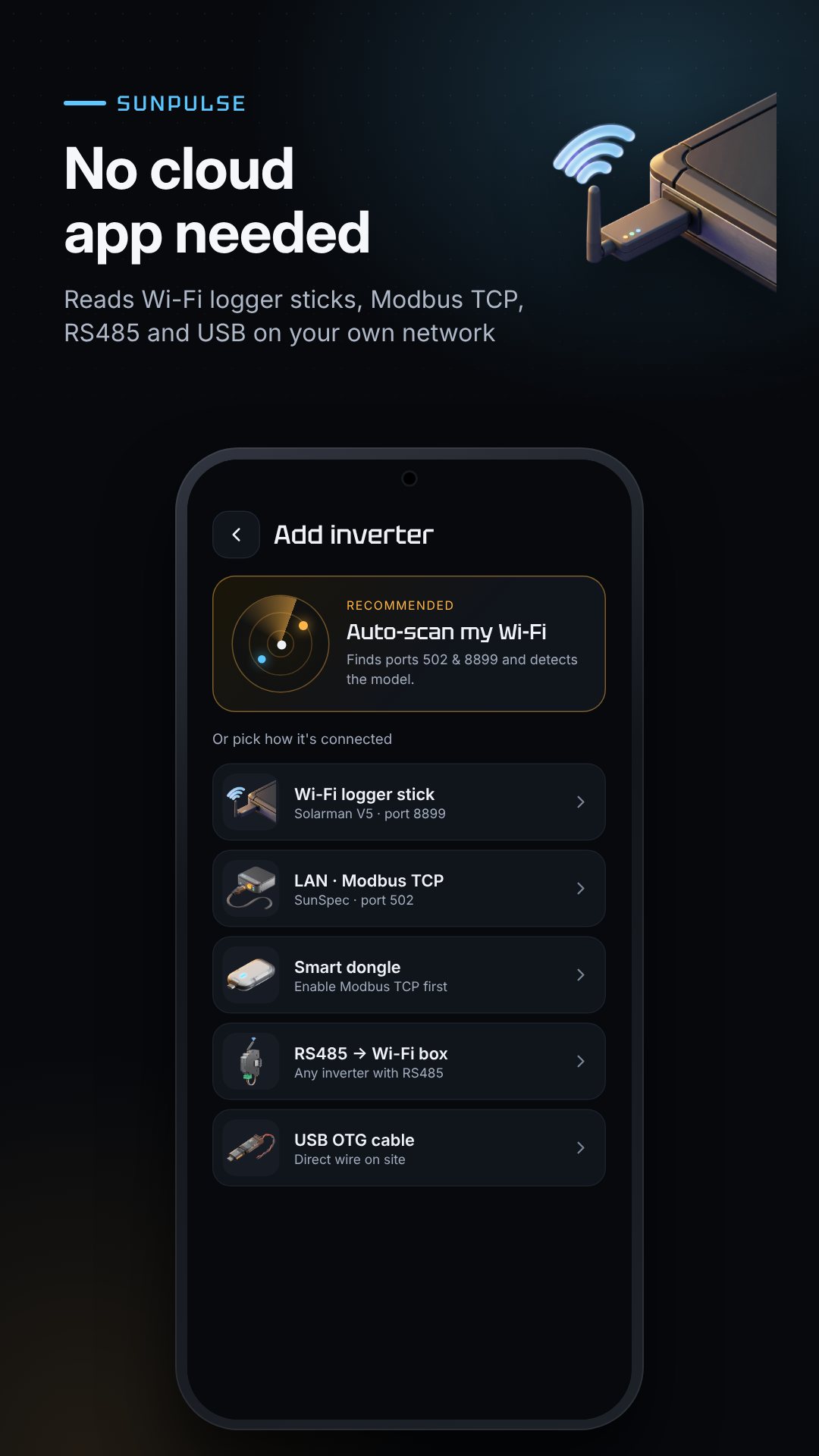
Open auto-scan and SunPulse sends a UDP discovery ping (Solarman sticks answer on port 48899), sweeps the local subnet for the Modbus ports, and identifies what it finds. You can also scan the QR code on a logger stick with the camera, or type the address by hand — and each inverter is saved so the next launch reconnects on its own.
Live power flow, history and real money
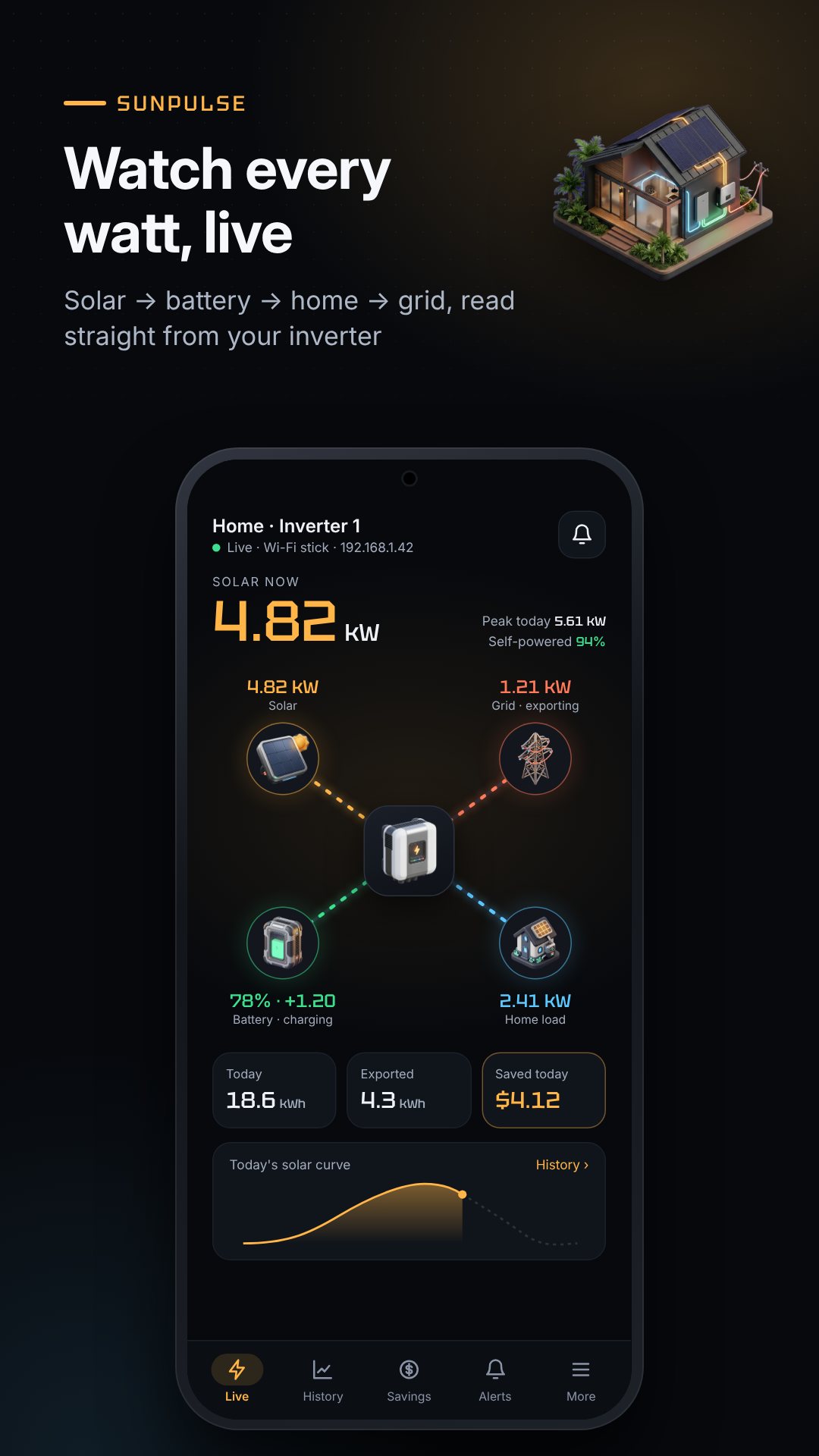
The dashboard shows an animated power-flow diagram — solar, battery, grid and home — with battery state of charge, temperatures and grid voltage and frequency, refreshed every few seconds. History rolls the readings up by day, week, month and year. The Savings screen is the part owners keep coming back to: set a time-of-use tariff with peak and off-peak rates and an export (feed-in) rate, and SunPulse separates what you saved by using your own solar from what you earned exporting, for both this month and the lifetime of the system.
Alerts that watch while you are not looking
The alert engine turns readings into notifications: grid lost and grid back (confirmed over two readings so a blip does not spam you), battery low at a percentage you choose, battery full, inverter fault codes with readable labels, and a low-yield warning that compares midday output against the best of your last seven days.
Pro tools for installers and tinkerers
- Home Assistant / MQTT — publishes 14 sensors (solar, battery, grid and load power, SOC, voltages, temperatures, daily energy) with auto-discovery, so they appear in Home Assistant on their own.
- Old-phone logger mode — leave a spare Android phone logging 24/7 as a foreground service, with optional ntfy push to your main phone, no account required.
- CSV export — share your logged minutes for a spreadsheet.
- Change inverter settings — write a single holding register, with a one-tap undo of the previous value.
- Installer console — raw Modbus read and write with function codes, hex view and a live traffic log.
- Custom register profiles — build, import and export JSON profiles for inverters not yet covered.
- Home-screen widget — solar kW, battery percentage, kWh today and money saved today at a glance.
How to add your inverter and start monitoring
- Make sure your phone is on the same Wi-Fi as the inverter's logger stick or dongle.
- Tap Add inverter and choose Auto-scan (or scan the stick's QR code).
- Pick your inverter from the results — SunPulse detects Solarman, Modbus TCP or SunSpec automatically.
- Open the dashboard to watch live power flow, battery and grid.
- Set your tariff under Savings so the app can show what your solar is worth.
Yours, offline, no cloud lock-in
Everything SunPulse records stays on the phone in a local database, with no account and no manufacturer server in the loop. The interface is available in English, Thai, Filipino, Vietnamese and Urdu.
Good to know before you connect
With Pro, SunPulse can write inverter settings — the register-write and console tools are meant for installers, so change a register only if you know what it does, as a wrong value can affect how your inverter runs. The app is free with ads and offers an optional one-time Pro purchase; the free tier covers one inverter and seven days of history.
Frequently asked questions
Does SunPulse need an internet connection or an account?
No. It talks to your inverter over your local Wi-Fi or a cable, with no account and no cloud portal, so it keeps working even when the manufacturer's servers are down.
Which inverters and connections does it support?
Solarman Wi-Fi sticks, Modbus TCP devices, auto-detected SunSpec inverters, and Modbus RTU over an RS485 or USB-RS485 adapter; a Demo mode lets you try it with no hardware.
Can I see SunPulse data in Home Assistant?
Yes, with Pro. The MQTT bridge publishes 14 sensors with Home Assistant auto-discovery, so they show up without manual YAML.
Is SunPulse free?
Yes, it is free to download with ads, and offers an optional one-time Pro purchase that unlocks unlimited history, alerts, the widget, MQTT, CSV export and more.