 By the NAXTECH team · Published 1 Apr 2026 · Updated 10 Sept 2026 · Hands-on with v1.0
You have a birth time, a notebook full of clients, and a phone that can only ever tell you a sun sign. The moment you want a real wheel — exact houses, the right ayanamsa, transits hitting a progressed Moon — you are back at a desktop or paying a website per chart. AstroPro: Gold Natal Chart was built to put that whole studio in your pocket, and to keep it working on a plane, at a doorway, or anywhere with no signal.
AstroPro is a professional Western astrology app built around the natal chart, with a real ephemeris engine running on the device. There is no account, no cloud, and no ads — your clients and their data stay on your phone, and every calculation happens locally.
The chart form is where the accuracy begins. You pick a birth place from an offline atlas of 165 cities with IANA time zones, and the app flags the awkward cases automatically: a daylight-saving gap at the birth minute, an unknown birth time, or a manual UTC offset when you need one. Each chart carries a Rodden rating (AA, A, B, C, DD, X) so the quality of the data is recorded alongside the result. You then choose from 30 house systems — Placidus, Koch, Regiomontanus, Campanus, Porphyry, Equal, Whole Sign and more — and one of 8 zodiacs: tropical, or sidereal with the Fagan-Allen, Lahiri, DeLuce, Raman, Usha-Shashi, Krishnamurti or Djwhal Khul ayanamsa.
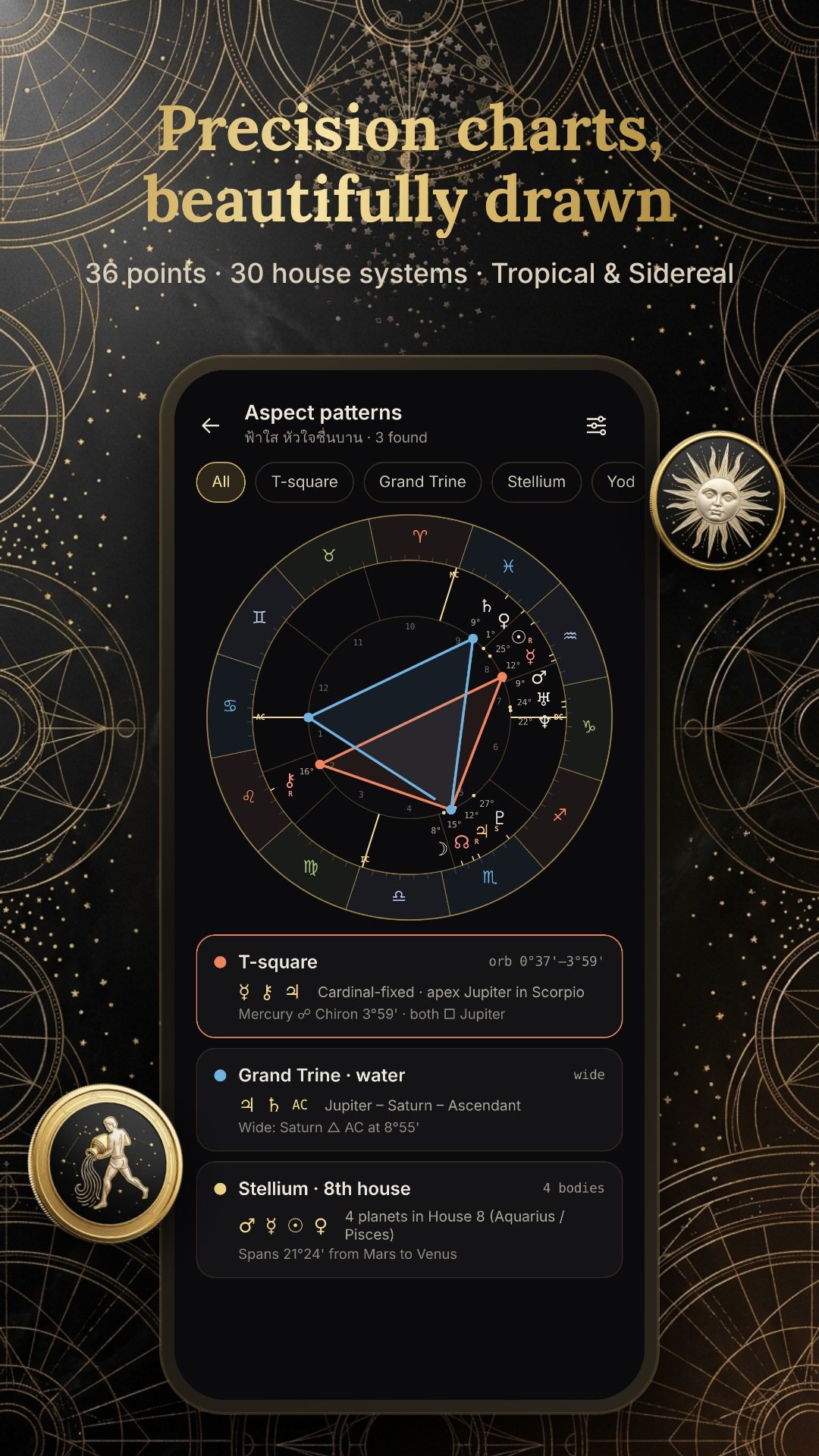
The wheel plots the ten planets plus Chiron and the lunar nodes by default, and you can add the South Node, Black Moon Lilith, the four main asteroids — Ceres, Pallas, Juno and Vesta — the Part of Fortune, the Vertex and the East Point. Aspects are drawn as colour-coded lines across the centre, with conjunction, opposition, trine, square and sextile alongside the minor family, and the app detects classical chart patterns on top of them. A time scrubber with a play control animates the wheel forward, and the tropical-to-sidereal switch tweens between zodiacs so you can see the shift.
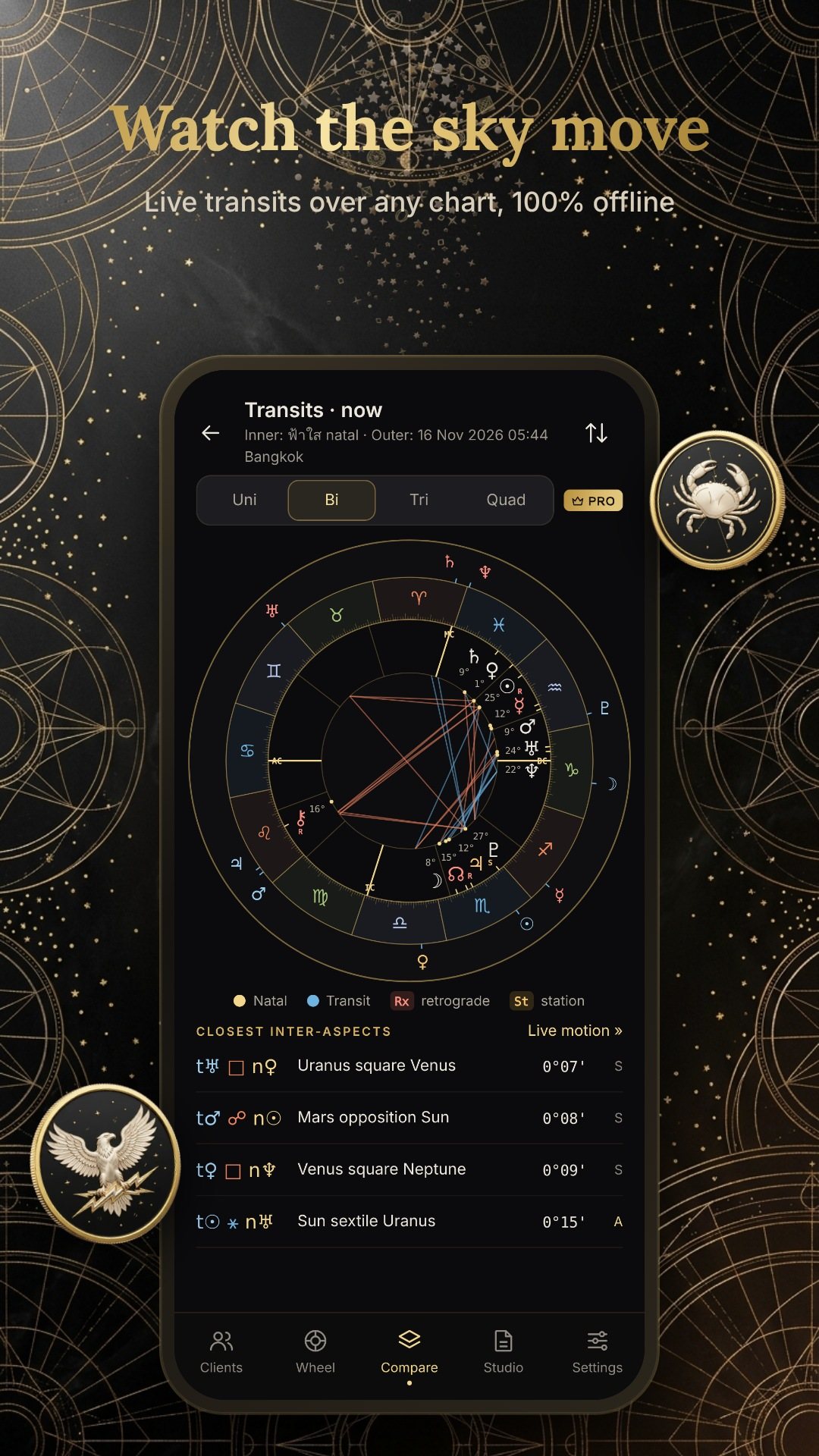
AstroPro is not only a natal drawer. The compare hub covers live transits with a one-tap jump to the next exact contact, secondary progressions, solar arc directions, the solar and lunar returns, synastry, and both the composite and Davison midpoint charts — with a quad-wheel for the dense comparisons. The Tools drawer adds a sky-now view, dignities and almuten, a retrograde calendar, a transit timeline, an ephemeris table, a declination graph, planetary hours, harmonics, a 90-degree dial and an electional search for picking a good moment.
When the reading is done, the Studio builds a PDF report with your own brand kit, or exports a share image card as a PNG. Home-screen widgets show the current moon phase, the sky now and your next exact transit, and scheduled alerts fire through Android notifications so a key transit does not slip past. You can import charts from .SFcht and .astropro files, merging or keeping duplicates, and back up your whole studio to a single .astropro file.
You can keep a full client list with notes, folders and tags, search and sort it, and undo a deletion. The free sandbox holds three saved charts so you can try the full engine before deciding; Pro unlocks unlimited charts and the advanced tools, with a Master Expansion and optional ephemeris packs for extended date ranges. The interface is translated into eight languages, including English, so the vocabulary stays clear as you learn.
AstroPro is Android-only and runs entirely offline; the only connection it needs is a brief one to Google Play to complete a purchase. It requests notification permission so scheduled transit alerts can appear, and nothing else — no location, camera or contacts. Astrology is offered for reflection and study, not as professional medical, legal or financial advice.
Yes. The ephemeris engine, the 165-city atlas and every chart calculation run on your device, so you can cast and read a chart with no connection.
Thirty house systems from Placidus to Whole Sign, and eight zodiacs — tropical plus the Fagan-Allen, Lahiri, DeLuce, Raman, Usha-Shashi, Krishnamurti and Djwhal Khul sidereal ayanamsas.
It is free to start with up to three saved charts and no ads at all; unlimited charts and the advanced tools are a one-time or subscription in-app purchase.
Yes. You can import .SFcht and .astropro files with duplicate handling, and back up your whole studio to a single .astropro file.